> ## Documentation Index
> Fetch the complete documentation index at: https://hc.saas-manager.biz.nuro.jp/llms.txt
> Use this file to discover all available pages before exploring further.

# Front

> Instructions for integrating with Front.

<Info>
  An account with administrator privileges is required for the integration.
</Info>

## Prerequisites

### How to Log In

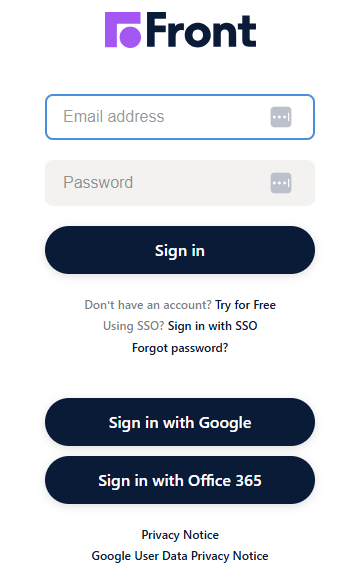
Go to the [Front login page](https://app.frontapp.com/signin) and enter your email address and password to log in.
<img src="https://mintcdn.com/admina-sbn/suP2b8lZWj05rQof/images/integrations/2r1x818kde/2026-03-30-140628.png?fit=max&auto=format&n=suP2b8lZWj05rQof&q=85&s=775308a1e4a56d1b764bea3d73ba05a6" alt="Front login screen" width="360" height="572" data-path="images/integrations/2r1x818kde/2026-03-30-140628.png" />

### How to Find Your API Key

After logging in to Front, click **Settings** > **Company** > **Developers**.

<img src="https://mintcdn.com/admina-sbn/suP2b8lZWj05rQof/images/integrations/2r1x818kde/2026-03-30-154514.png?fit=max&auto=format&n=suP2b8lZWj05rQof&q=85&s=09054e06331f223a38cc828379e39d0c" alt="Settings > Company > Developers" data-og-width="417" width="417" data-og-height="805" height="805" data-path="images/integrations/2r1x818kde/2026-03-30-154514.png" data-optimize="true" data-opv="3" srcset="https://mintcdn.com/admina-sbn/suP2b8lZWj05rQof/images/integrations/2r1x818kde/2026-03-30-154514.png?w=280&fit=max&auto=format&n=suP2b8lZWj05rQof&q=85&s=34b316200b879de89e86e0844f0c10cd 280w, https://mintcdn.com/admina-sbn/suP2b8lZWj05rQof/images/integrations/2r1x818kde/2026-03-30-154514.png?w=560&fit=max&auto=format&n=suP2b8lZWj05rQof&q=85&s=578af66dc627b8e19a50913f427ecdab 560w, https://mintcdn.com/admina-sbn/suP2b8lZWj05rQof/images/integrations/2r1x818kde/2026-03-30-154514.png?w=840&fit=max&auto=format&n=suP2b8lZWj05rQof&q=85&s=12380cad46d69cb833a7b24ef46d34d5 840w, https://mintcdn.com/admina-sbn/suP2b8lZWj05rQof/images/integrations/2r1x818kde/2026-03-30-154514.png?w=1100&fit=max&auto=format&n=suP2b8lZWj05rQof&q=85&s=cad7fe9292abb00741d7ce508bb101f7 1100w, https://mintcdn.com/admina-sbn/suP2b8lZWj05rQof/images/integrations/2r1x818kde/2026-03-30-154514.png?w=1650&fit=max&auto=format&n=suP2b8lZWj05rQof&q=85&s=6c1686ec3bfc3bb9464d61790da8cc8a 1650w, https://mintcdn.com/admina-sbn/suP2b8lZWj05rQof/images/integrations/2r1x818kde/2026-03-30-154514.png?w=2500&fit=max&auto=format&n=suP2b8lZWj05rQof&q=85&s=038bea85ea847f64ba94d8fc7c0fe2c2 2500w" />

Click **API tokens** > **Create API token**.

<img src="https://mintcdn.com/admina-sbn/suP2b8lZWj05rQof/images/integrations/2r1x818kde/2026-03-30-173736.png?fit=max&auto=format&n=suP2b8lZWj05rQof&q=85&s=2f23b861cf13880261c885c32b7c2587" alt="API tokens > Create API token" data-og-width="1572" width="1572" data-og-height="198" height="198" data-path="images/integrations/2r1x818kde/2026-03-30-173736.png" data-optimize="true" data-opv="3" srcset="https://mintcdn.com/admina-sbn/suP2b8lZWj05rQof/images/integrations/2r1x818kde/2026-03-30-173736.png?w=280&fit=max&auto=format&n=suP2b8lZWj05rQof&q=85&s=9f640a96c2883008d5a23fcaadbd5e9a 280w, https://mintcdn.com/admina-sbn/suP2b8lZWj05rQof/images/integrations/2r1x818kde/2026-03-30-173736.png?w=560&fit=max&auto=format&n=suP2b8lZWj05rQof&q=85&s=1f53900bb4e52a3cd02b308f40a57930 560w, https://mintcdn.com/admina-sbn/suP2b8lZWj05rQof/images/integrations/2r1x818kde/2026-03-30-173736.png?w=840&fit=max&auto=format&n=suP2b8lZWj05rQof&q=85&s=4e0c1c43b5ec9626085fd2c97e966c8a 840w, https://mintcdn.com/admina-sbn/suP2b8lZWj05rQof/images/integrations/2r1x818kde/2026-03-30-173736.png?w=1100&fit=max&auto=format&n=suP2b8lZWj05rQof&q=85&s=a3bb559fccee2b958c868729394ac1a1 1100w, https://mintcdn.com/admina-sbn/suP2b8lZWj05rQof/images/integrations/2r1x818kde/2026-03-30-173736.png?w=1650&fit=max&auto=format&n=suP2b8lZWj05rQof&q=85&s=801b9471439c5becccca68a27c863c7d 1650w, https://mintcdn.com/admina-sbn/suP2b8lZWj05rQof/images/integrations/2r1x818kde/2026-03-30-173736.png?w=2500&fit=max&auto=format&n=suP2b8lZWj05rQof&q=85&s=cb64a379cd02e03950164ddb3003b3e3 2500w" />

Enter a token name and click **Continue**.

<img src="https://mintcdn.com/admina-sbn/suP2b8lZWj05rQof/images/integrations/2r1x818kde/screenshot-2026-02-17-at-16-48-01.png?fit=max&auto=format&n=suP2b8lZWj05rQof&q=85&s=a06a5dfdee2c8119bed2dd31096c3057" alt="Token name input screen" width="2100" height="1512" data-path="images/integrations/2r1x818kde/screenshot-2026-02-17-at-16-48-01.png" />

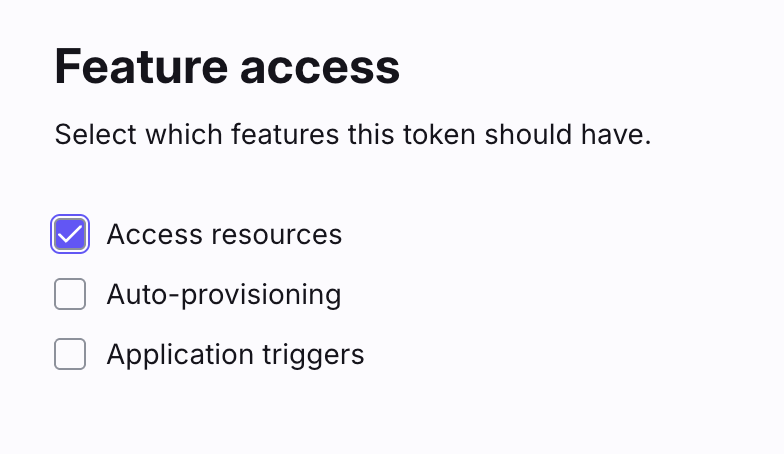
Under Feature access, select **Access resources**.
<img src="https://mintcdn.com/admina-sbn/suP2b8lZWj05rQof/images/integrations/2r1x818kde/screenshot-2026-02-17-at-16-48-25.png?fit=max&auto=format&n=suP2b8lZWj05rQof&q=85&s=df592dcaa4f13ba450bf4b8ca5c51e14" alt="Select Access resources under Feature access" width="784" height="454" data-path="images/integrations/2r1x818kde/screenshot-2026-02-17-at-16-48-25.png" />

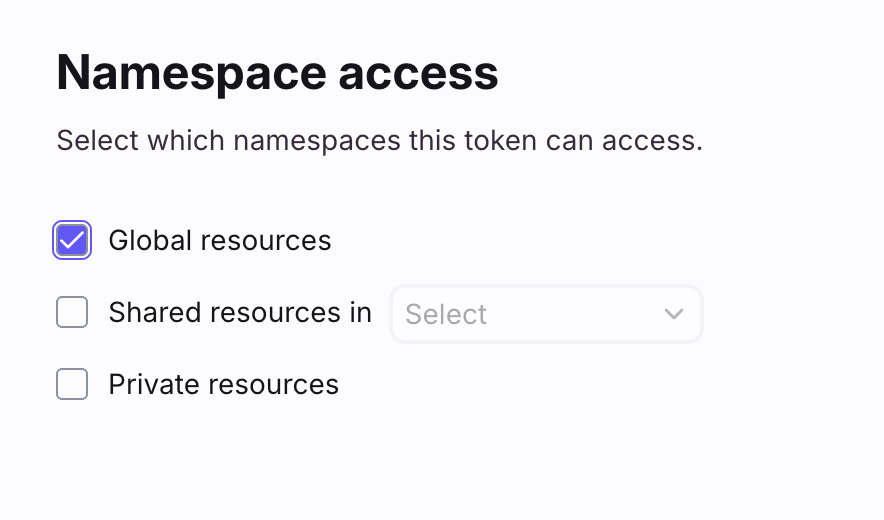
Under Namespace access, select **Global resources**.
<img src="https://mintcdn.com/admina-sbn/suP2b8lZWj05rQof/images/integrations/2r1x818kde/screenshot-2026-02-17-at-16-49-51.png?fit=max&auto=format&n=suP2b8lZWj05rQof&q=85&s=785710e74f98decbe3f11b8f24e4bd60" alt="Select Global resources under Namespace access" width="884" height="520" data-path="images/integrations/2r1x818kde/screenshot-2026-02-17-at-16-49-51.png" />

Select **Read** for the teammates permission and click **Create**.

<img src="https://mintcdn.com/admina-sbn/suP2b8lZWj05rQof/images/integrations/2r1x818kde/image-2026-03-30-t-180417-402.png?fit=max&auto=format&n=suP2b8lZWj05rQof&q=85&s=df84428ac2a0379c72ce81fda75488ab" alt="Select Read for teammates permission" width="2044" height="364" data-path="images/integrations/2r1x818kde/image-2026-03-30-t-180417-402.png" />

Copy the generated **API key**.

## Integration Setup

In the MoneyForward Admina integrations screen, search for **Front**.

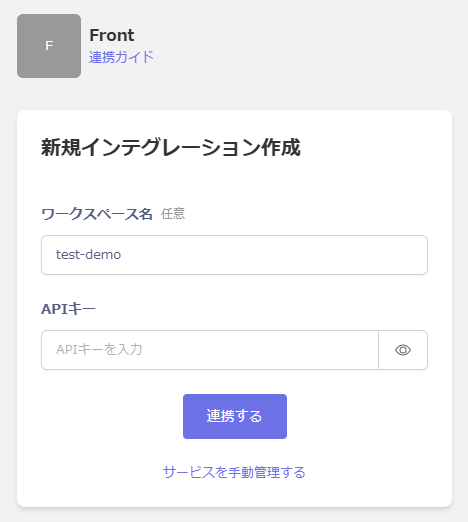
Enter any workspace name and the **API key** obtained in the previous step, then click **Connect**.
<img src="https://mintcdn.com/admina-sbn/suP2b8lZWj05rQof/images/integrations/2r1x818kde/2026-03-30-182047.png?fit=max&auto=format&n=suP2b8lZWj05rQof&q=85&s=c371cbdccf621ebed7027e0704ddca2a" alt="Integration settings screen in Admina" width="468" height="522" data-path="images/integrations/2r1x818kde/2026-03-30-182047.png" />

Once the integration is successful, the registered user information will appear in the account list.

If the integration does not complete successfully.
Click **Edit** from the Status tab on the integrations screen and try again.

If the issue persists, please contact us via chat.
