> ## Documentation Index
> Fetch the complete documentation index at: https://hc.saas-manager.biz.nuro.jp/llms.txt
> Use this file to discover all available pages before exploring further.

# AppFollow

> Step-by-step guide for obtaining an AppFollow API key and connecting with administrator privileges. Detailed setup guide for Admina integration.

<Info>
  An account with administrator privileges is required for the integration.
</Info>

## Prerequisites

### How to Log In

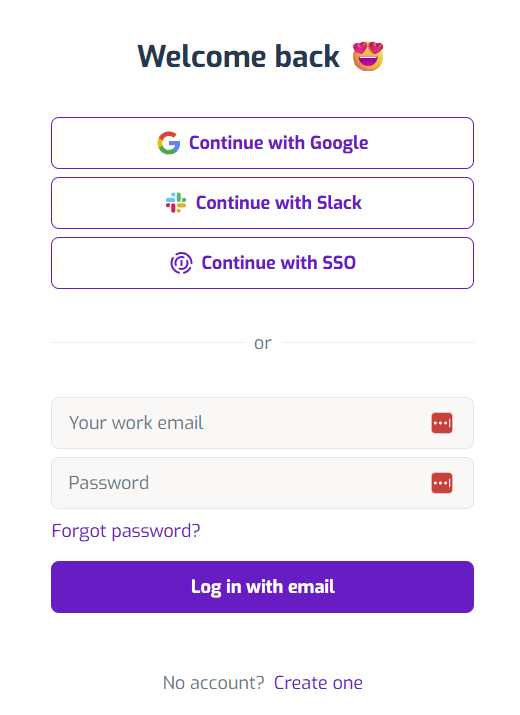
Go to the [AppFollow login page](https://watch.appfollow.io), enter your email address and password, and log in.
<img src="https://mintcdn.com/admina-sbn/qJjJh1wxF6j7EyS6/images/integrations/7cfqtg86oq/2025-12-04-183655.png?fit=max&auto=format&n=qJjJh1wxF6j7EyS6&q=85&s=3a2446f331b892d129d2f583f0f44356" alt="AppFollow login screen" width="520" height="715" data-path="images/integrations/7cfqtg86oq/2025-12-04-183655.png" />

### How to Obtain the API Key

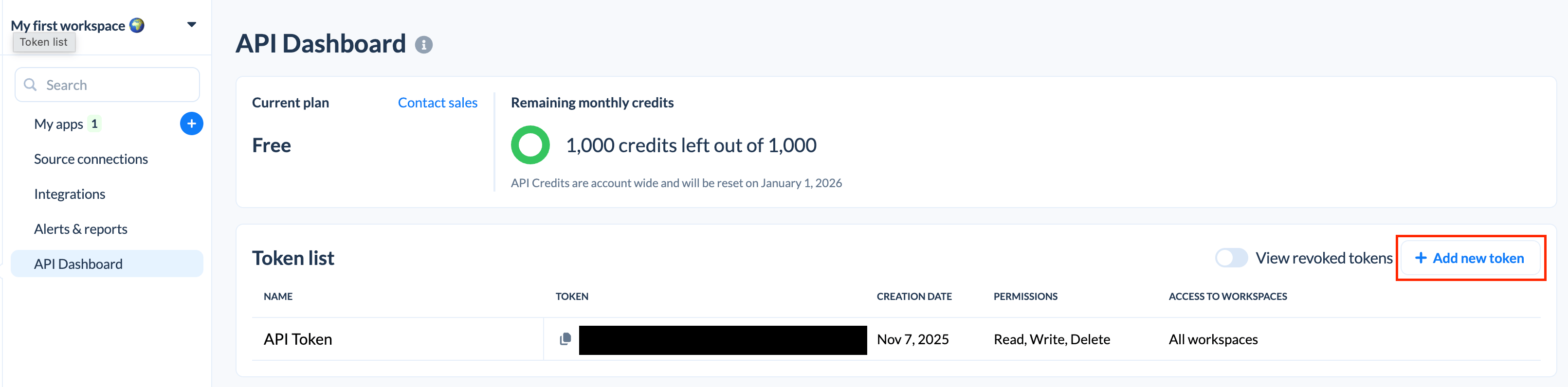
After logging in to AppFollow, click **Integrations > API Dashboard**.

<img src="https://mintcdn.com/admina-sbn/qJjJh1wxF6j7EyS6/images/integrations/7cfqtg86oq/screenshot-2025-12-01-at-11-01-03.png?fit=max&auto=format&n=qJjJh1wxF6j7EyS6&q=85&s=75d78dd1cad0f9a064e6f3e57d379041" alt="Integrations > API Dashboard" data-og-width="1344" width="1344" data-og-height="896" height="896" data-path="images/integrations/7cfqtg86oq/screenshot-2025-12-01-at-11-01-03.png" data-optimize="true" data-opv="3" srcset="https://mintcdn.com/admina-sbn/qJjJh1wxF6j7EyS6/images/integrations/7cfqtg86oq/screenshot-2025-12-01-at-11-01-03.png?w=280&fit=max&auto=format&n=qJjJh1wxF6j7EyS6&q=85&s=b65062cba47090d19a3f84448f7568c8 280w, https://mintcdn.com/admina-sbn/qJjJh1wxF6j7EyS6/images/integrations/7cfqtg86oq/screenshot-2025-12-01-at-11-01-03.png?w=560&fit=max&auto=format&n=qJjJh1wxF6j7EyS6&q=85&s=56d6b834bf743f4151a82e6f626b877f 560w, https://mintcdn.com/admina-sbn/qJjJh1wxF6j7EyS6/images/integrations/7cfqtg86oq/screenshot-2025-12-01-at-11-01-03.png?w=840&fit=max&auto=format&n=qJjJh1wxF6j7EyS6&q=85&s=330174b9c24fbea57507ccb00d4f9242 840w, https://mintcdn.com/admina-sbn/qJjJh1wxF6j7EyS6/images/integrations/7cfqtg86oq/screenshot-2025-12-01-at-11-01-03.png?w=1100&fit=max&auto=format&n=qJjJh1wxF6j7EyS6&q=85&s=6c3264a16d96ca4e84e82db8cfc03379 1100w, https://mintcdn.com/admina-sbn/qJjJh1wxF6j7EyS6/images/integrations/7cfqtg86oq/screenshot-2025-12-01-at-11-01-03.png?w=1650&fit=max&auto=format&n=qJjJh1wxF6j7EyS6&q=85&s=25ca591698593d62f3e813f3d5ec8c95 1650w, https://mintcdn.com/admina-sbn/qJjJh1wxF6j7EyS6/images/integrations/7cfqtg86oq/screenshot-2025-12-01-at-11-01-03.png?w=2500&fit=max&auto=format&n=qJjJh1wxF6j7EyS6&q=85&s=839300a7947b183ecf0d5e4e7471417b 2500w" />

Click **Add new token**.

<img src="https://mintcdn.com/admina-sbn/qJjJh1wxF6j7EyS6/images/integrations/7cfqtg86oq/screenshot-2025-12-01-at-11-02-01.png?fit=max&auto=format&n=qJjJh1wxF6j7EyS6&q=85&s=213c191f1fac22d3a4cf80f8c0e7db0f" alt="Add new token" width="3222" height="796" data-path="images/integrations/7cfqtg86oq/screenshot-2025-12-01-at-11-02-01.png" />

Fill in the following fields and click **Create**.

* Token name: Enter any token name
* Permissions: Select **Select all**
* Access to workspaces: Select **All workspaces**

<img src="https://mintcdn.com/admina-sbn/qJjJh1wxF6j7EyS6/images/integrations/7cfqtg86oq/screenshot-2025-12-01-at-11-04-27.png?fit=max&auto=format&n=qJjJh1wxF6j7EyS6&q=85&s=6d07afadcefeec34f53337fd56df6e81" alt="Token creation screen" width="1054" height="744" data-path="images/integrations/7cfqtg86oq/screenshot-2025-12-01-at-11-04-27.png" />

Copy the generated **API key**.

## Integration Setup

In the MoneyForward Admina integration screen, search for **Appfollow**.

Enter any workspace name and the **API key** obtained in the previous step, then click **Connect**.

<img src="https://mintcdn.com/admina-sbn/qJjJh1wxF6j7EyS6/images/integrations/7cfqtg86oq/2025-12-05-121748.png?fit=max&auto=format&n=qJjJh1wxF6j7EyS6&q=85&s=31f45567d28ffef8432b662b817d3509" alt="Admina integration screen" width="475" height="522" data-path="images/integrations/7cfqtg86oq/2025-12-05-121748.png" />

Once the integration is successful, registered user information will appear in the account list.

If the process does not complete successfully, click **Edit** in the status tab of the integration screen and try again.

If the issue persists, please contact us via chat.