> ## Documentation Index
> Fetch the complete documentation index at: https://hc.saas-manager.biz.nuro.jp/llms.txt
> Use this file to discover all available pages before exploring further.

# Apollo

> Obtain an Apollo API key and integrate with Admina. Configure with admin privileges and register your workspace for easy integration.

<Info>
  An account with administrator privileges is required for integration.
</Info>

## Prerequisites

### How to Log In

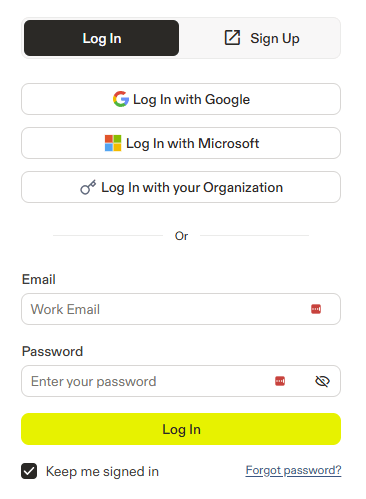
Go to the [Apollo login page](https://app.apollo.io/#/login?locale=en) and log in with your email address and password.
<img src="https://mintcdn.com/admina-sbn/qJjJh1wxF6j7EyS6/images/integrations/7qfa2jo3vg/2025-12-19-112735.png?fit=max&auto=format&n=qJjJh1wxF6j7EyS6&q=85&s=7ec3b23623578a1ac344c1d416e493ef" alt="Apollo login screen" width="366" height="499" data-path="images/integrations/7qfa2jo3vg/2025-12-19-112735.png" />

### How to Obtain Your API Key

After logging in to Apollo, click **Admin Settings** > **Integrations**.

<img src="https://mintcdn.com/admina-sbn/qJjJh1wxF6j7EyS6/images/integrations/7qfa2jo3vg/screenshot-2025-12-10-at-12-10-22.png?fit=max&auto=format&n=qJjJh1wxF6j7EyS6&q=85&s=fab39c151fb62b94b493daf7b49e34ca" alt="Admin Settings > Integrations" data-og-width="796" width="796" data-og-height="646" height="646" data-path="images/integrations/7qfa2jo3vg/screenshot-2025-12-10-at-12-10-22.png" data-optimize="true" data-opv="3" srcset="https://mintcdn.com/admina-sbn/qJjJh1wxF6j7EyS6/images/integrations/7qfa2jo3vg/screenshot-2025-12-10-at-12-10-22.png?w=280&fit=max&auto=format&n=qJjJh1wxF6j7EyS6&q=85&s=2fecfb318d2957ea6e8ca2a06a80971c 280w, https://mintcdn.com/admina-sbn/qJjJh1wxF6j7EyS6/images/integrations/7qfa2jo3vg/screenshot-2025-12-10-at-12-10-22.png?w=560&fit=max&auto=format&n=qJjJh1wxF6j7EyS6&q=85&s=d6c67b1104e9aa436c26cfe24d3f6b1f 560w, https://mintcdn.com/admina-sbn/qJjJh1wxF6j7EyS6/images/integrations/7qfa2jo3vg/screenshot-2025-12-10-at-12-10-22.png?w=840&fit=max&auto=format&n=qJjJh1wxF6j7EyS6&q=85&s=e7e79d1b6f2f1b1e0bcd9d4af0c31a2d 840w, https://mintcdn.com/admina-sbn/qJjJh1wxF6j7EyS6/images/integrations/7qfa2jo3vg/screenshot-2025-12-10-at-12-10-22.png?w=1100&fit=max&auto=format&n=qJjJh1wxF6j7EyS6&q=85&s=8b366e3f0b9df83f9d89038fa67a7e10 1100w, https://mintcdn.com/admina-sbn/qJjJh1wxF6j7EyS6/images/integrations/7qfa2jo3vg/screenshot-2025-12-10-at-12-10-22.png?w=1650&fit=max&auto=format&n=qJjJh1wxF6j7EyS6&q=85&s=f4ba3e00efa1967cbbfaa3a448fabdc2 1650w, https://mintcdn.com/admina-sbn/qJjJh1wxF6j7EyS6/images/integrations/7qfa2jo3vg/screenshot-2025-12-10-at-12-10-22.png?w=2500&fit=max&auto=format&n=qJjJh1wxF6j7EyS6&q=85&s=5e2d3b01c4009d203fe81083836761bf 2500w" />

Click **Connect** under **API**.

<img src="https://mintcdn.com/admina-sbn/qJjJh1wxF6j7EyS6/images/integrations/7qfa2jo3vg/screenshot-2025-12-10-at-12-11-22.png?fit=max&auto=format&n=qJjJh1wxF6j7EyS6&q=85&s=3b18a17fa46092735c8c6e904efb6352" alt="API Connect" width="2432" height="270" data-path="images/integrations/7qfa2jo3vg/screenshot-2025-12-10-at-12-11-22.png" />

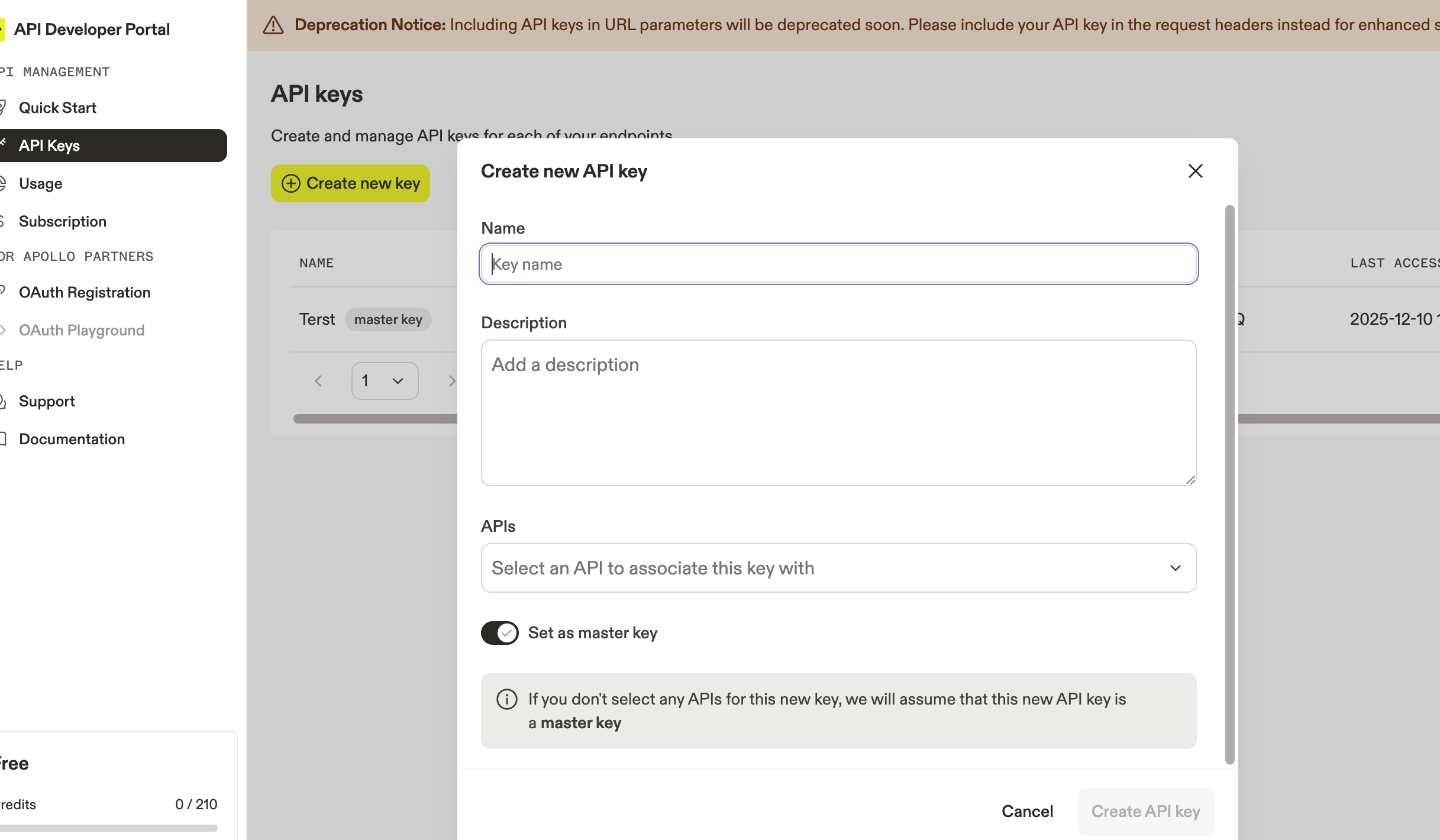
Click **API Keys** > **Create new key**.

Enter the required information, check **Set as master key**, and click **Create API key**.
<img src="https://mintcdn.com/admina-sbn/qJjJh1wxF6j7EyS6/images/integrations/7qfa2jo3vg/screenshot-2025-12-10-at-12-11-40.png?fit=max&auto=format&n=qJjJh1wxF6j7EyS6&q=85&s=af90adcda1da9b9e333be141914e3df7" alt="Creating an API Key" width="2434" height="1420" data-path="images/integrations/7qfa2jo3vg/screenshot-2025-12-10-at-12-11-40.png" />

Copy the generated **API key**.

## Integration Setup

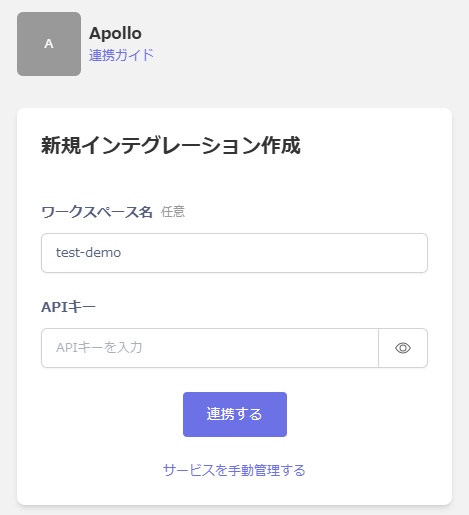
In the MoneyForward Admina integration screen, search for **Apollo**.

Enter a workspace name of your choice and the **API key** obtained in the previous step, then click **Connect**.
<img src="https://mintcdn.com/admina-sbn/qJjJh1wxF6j7EyS6/images/integrations/7qfa2jo3vg/2025-12-19-121123.png?fit=max&auto=format&n=qJjJh1wxF6j7EyS6&q=85&s=40887afc1ec78328b8a35eff804e272b" alt="Admina integration screen" width="469" height="515" data-path="images/integrations/7qfa2jo3vg/2025-12-19-121123.png" />

Once the integration is successful, the registered user information will appear in the account list.

If the process does not complete successfully.
Click **Edit** from the Status tab on the integration screen and try connecting again.

If the issue persists, please contact us via chat.
