> ## Documentation Index
> Fetch the complete documentation index at: https://hc.saas-manager.biz.nuro.jp/llms.txt
> Use this file to discover all available pages before exploring further.
# Money Forward Cloud Kintai Plus (formerly AKASHI)
> Steps to integrate with Money Forward Cloud Kintai Plus (formerly AKASHI).
## Supported Features
Account Deletion Account Creation
An account with administrator privileges is required for integration.
## Prerequisites
### How to Log In to Money Forward Cloud Kintai Plus (formerly AKASHI)
Go to the [Money Forward Cloud Kintai Plus login page](https://atnd.ak4.jp/ja/login?next=%2Fja) and log in with your **company ID, email address, and password**.
 ### How to Obtain the Access Key
After logging in to Money Forward Cloud Kintai Plus (formerly AKASHI), navigate to **Settings > Employees > Employee Settings**.
Click the **Edit** button for the account (company administrator) you want to allow API token issuance.
### How to Obtain the Access Key
After logging in to Money Forward Cloud Kintai Plus (formerly AKASHI), navigate to **Settings > Employees > Employee Settings**.
Click the **Edit** button for the account (company administrator) you want to allow API token issuance.
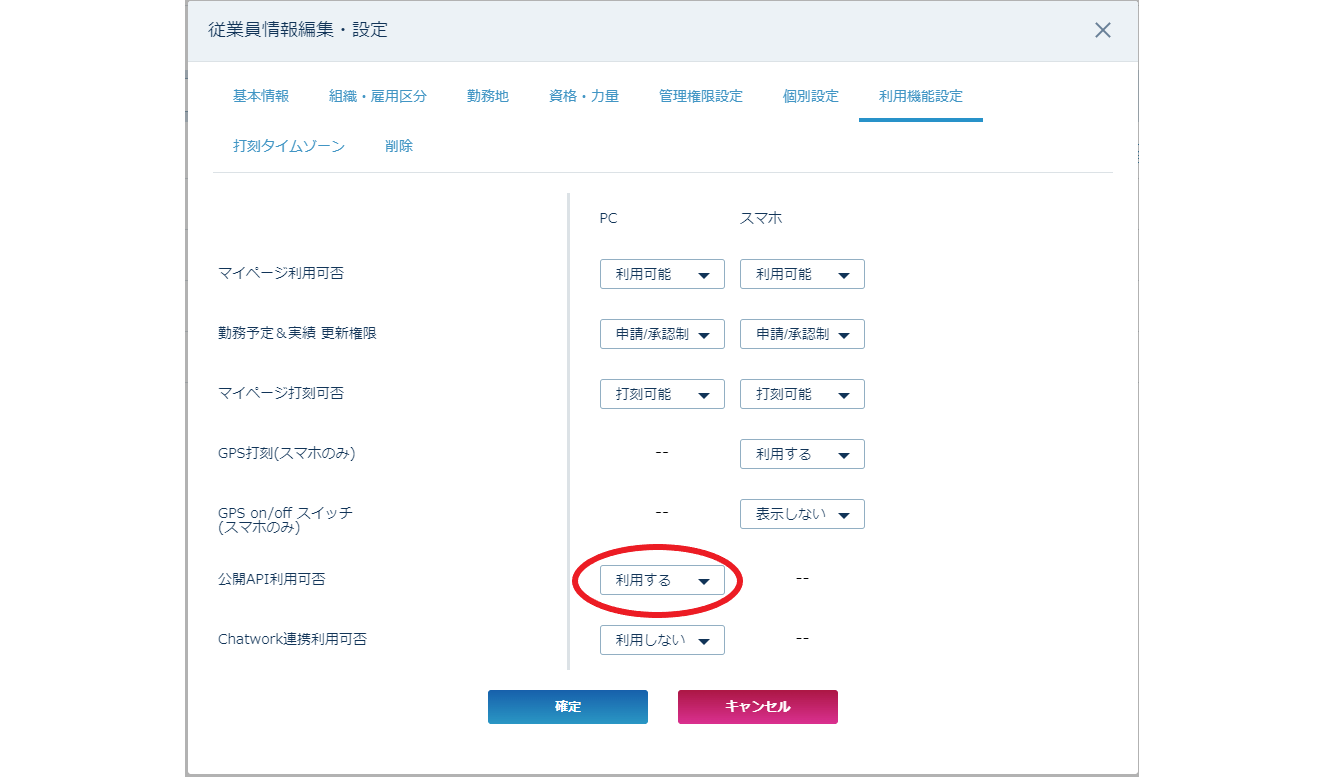
 Click the **Feature Settings** tab, select **Public API Usage: Enabled**, then click **Confirm**.
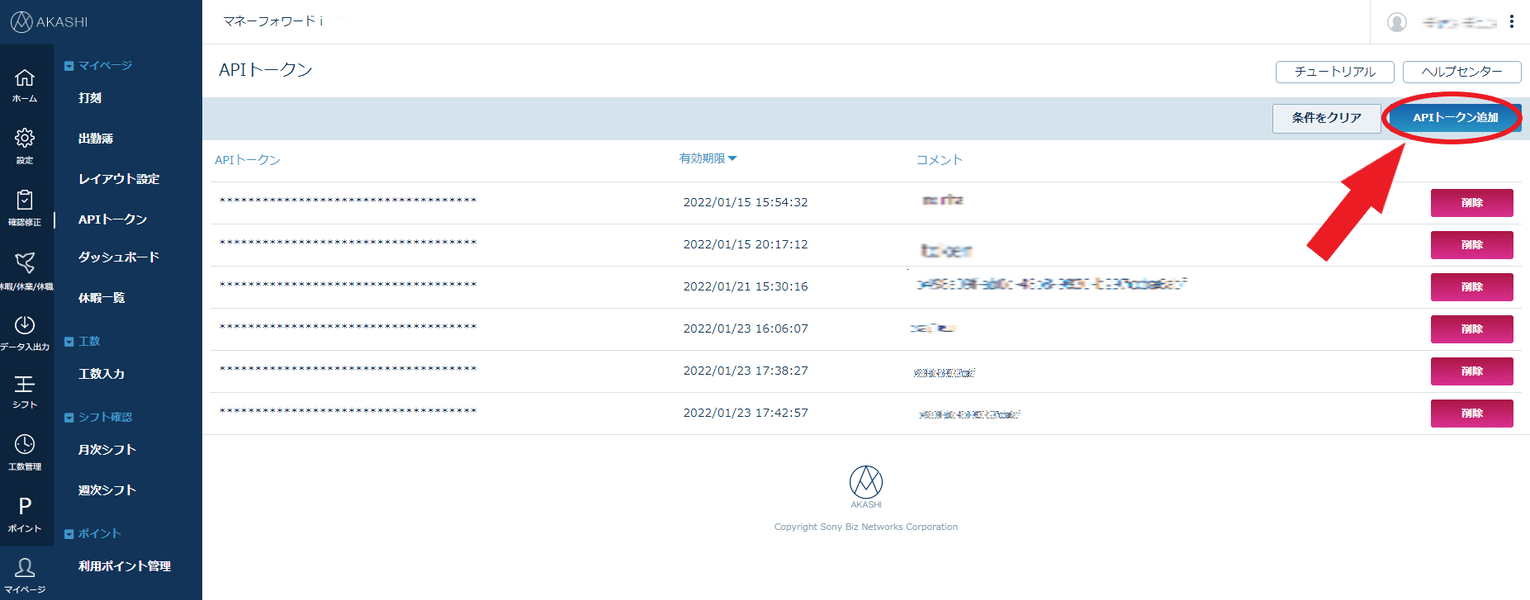
 Go to **My Page > API Token** and click **Add API Token** — a popup for creating a token will appear.
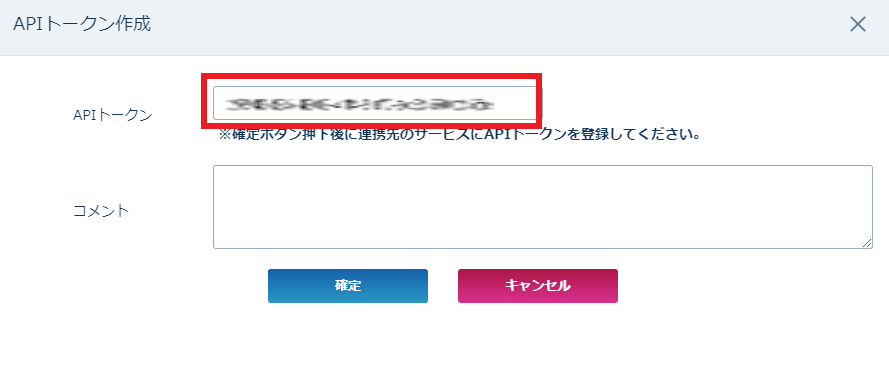
 The **API token** will be displayed — save it. This is your **access key**.
 [Money Forward Cloud Kintai Plus (formerly AKASHI) Public API Specification](https://akashi.zendesk.com/hc/ja/articles/115000475854-%E3%83%9E%E3%83%8D%E3%83%BC%E3%83%95%E3%82%A9%E3%83%AF%E3%83%BC%E3%83%89-%E3%82%AF%E3%83%A9%E3%82%A6%E3%83%89%E5%8B%A4%E6%80%A0Plus-%E5%85%AC%E9%96%8BAPI-%E4%BB%95%E6%A7%98)
The access token has a `validity period of 1 month and 1 day`.
We use a `token renewal API` to automatically extend it.
Because the validity period is short, if the token cannot be updated within the valid period due to an error, you can resume the integration by re-issuing the token.
## Integration Setup
On the integrations screen, search for **AKASHI (Money Forward Cloud Kintai Plus)**.
[Money Forward Cloud Kintai Plus (formerly AKASHI) Public API Specification](https://akashi.zendesk.com/hc/ja/articles/115000475854-%E3%83%9E%E3%83%8D%E3%83%BC%E3%83%95%E3%82%A9%E3%83%AF%E3%83%BC%E3%83%89-%E3%82%AF%E3%83%A9%E3%82%A6%E3%83%89%E5%8B%A4%E6%80%A0Plus-%E5%85%AC%E9%96%8BAPI-%E4%BB%95%E6%A7%98)
The access token has a `validity period of 1 month and 1 day`.
We use a `token renewal API` to automatically extend it.
Because the validity period is short, if the token cannot be updated within the valid period due to an error, you can resume the integration by re-issuing the token.
## Integration Setup
On the integrations screen, search for **AKASHI (Money Forward Cloud Kintai Plus)**.
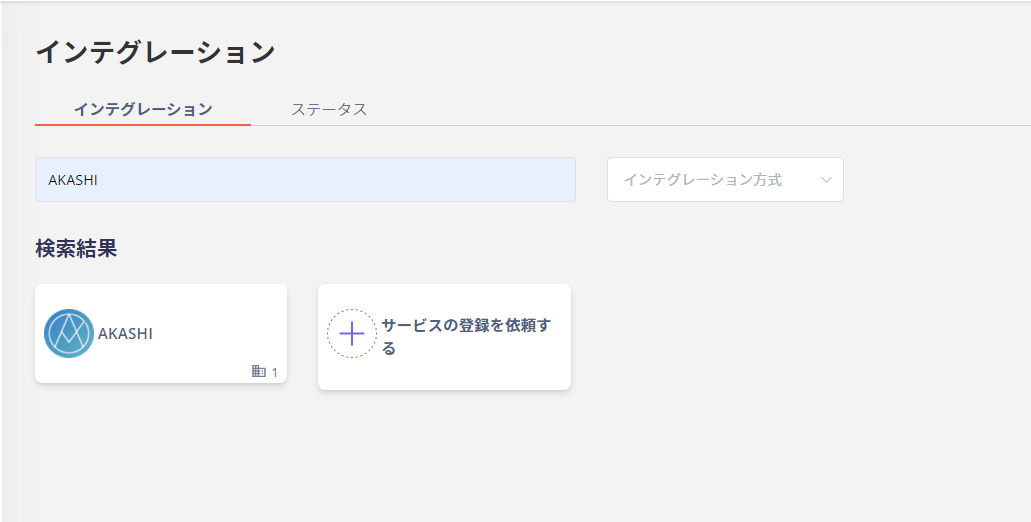 For the workspace key, enter your **Money Forward Cloud Kintai Plus (formerly AKASHI) login company ID**. Enter the **access key** obtained in the previous step, then click **Connect**.
 Once the integration with Money Forward Cloud Kintai Plus (formerly AKASHI) is successful, registered user information will appear in the account list.
If the process does not complete successfully, go to the status tab on the integrations screen, click **Edit**, and try connecting again.
If the issue persists, please contact us via chat.
## Manual Account Matching for SaaS Without Email Retrieval
This service is a SaaS where email addresses cannot be retrieved, so the user type will be determined as "Unknown."
If needed, manually link (deduplicate/merge) accounts with other accounts.
For details on the settings, please refer to the following.
[Manually link (deduplicate/merge) a SaaS account to another account](/en/it-management/saas-management/d97dy5z2l7-merge)
Once the integration with Money Forward Cloud Kintai Plus (formerly AKASHI) is successful, registered user information will appear in the account list.
If the process does not complete successfully, go to the status tab on the integrations screen, click **Edit**, and try connecting again.
If the issue persists, please contact us via chat.
## Manual Account Matching for SaaS Without Email Retrieval
This service is a SaaS where email addresses cannot be retrieved, so the user type will be determined as "Unknown."
If needed, manually link (deduplicate/merge) accounts with other accounts.
For details on the settings, please refer to the following.
[Manually link (deduplicate/merge) a SaaS account to another account](/en/it-management/saas-management/d97dy5z2l7-merge)