> ## Documentation Index
> Fetch the complete documentation index at: https://hc.saas-manager.biz.nuro.jp/llms.txt
> Use this file to discover all available pages before exploring further.
# Valimail
> Instructions for integrating with Valimail.
## Supported Features
Account Deactivation Account Provisioning
## Integration Setup
In the MoneyForward Admina integration screen, search for **Valimail**.
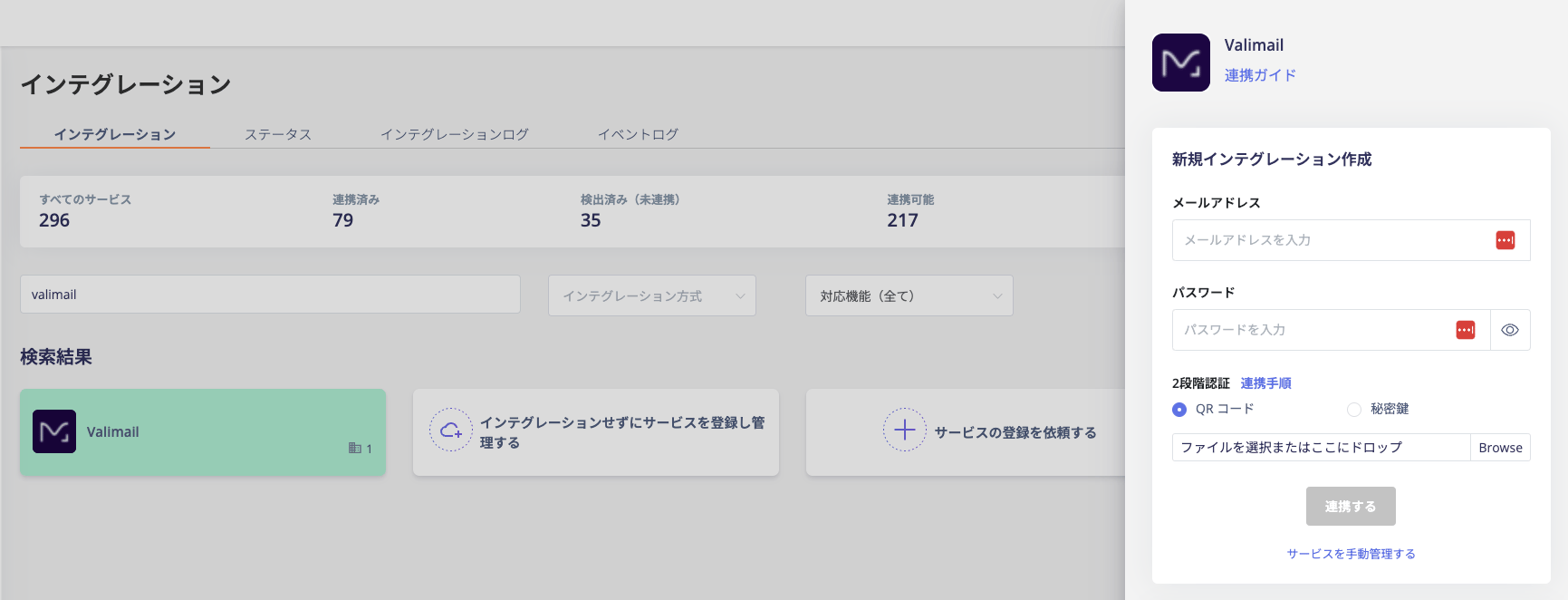 Enter your Valimail **login email address and password**, then click **Connect**.
Once the integration is successful, registered user information will appear in the account list.
If the setup does not complete successfully, go to the Status tab on the integration screen, click **Edit**, and try connecting again.
If the issue persists, please contact us via chat.
Enter your Valimail **login email address and password**, then click **Connect**.
Once the integration is successful, registered user information will appear in the account list.
If the setup does not complete successfully, go to the Status tab on the integration screen, click **Edit**, and try connecting again.
If the issue persists, please contact us via chat.