> ## Documentation Index
> Fetch the complete documentation index at: https://hc.saas-manager.biz.nuro.jp/llms.txt
> Use this file to discover all available pages before exploring further.
# 2026/1/23 Release!!
> Launched the import/export feature for survey templates. You can now start internal surveys instantly by simply importing a template.
 We have launched the "Import/Export" feature for survey templates! By simply importing a template, you can now start internal surveys instantly.
## Benefits of This Feature
### 3 Ready-to-Use Standard Templates
We currently publish the following JSON files on the help page. Just download a template and import it to get started right away.
## How to Use
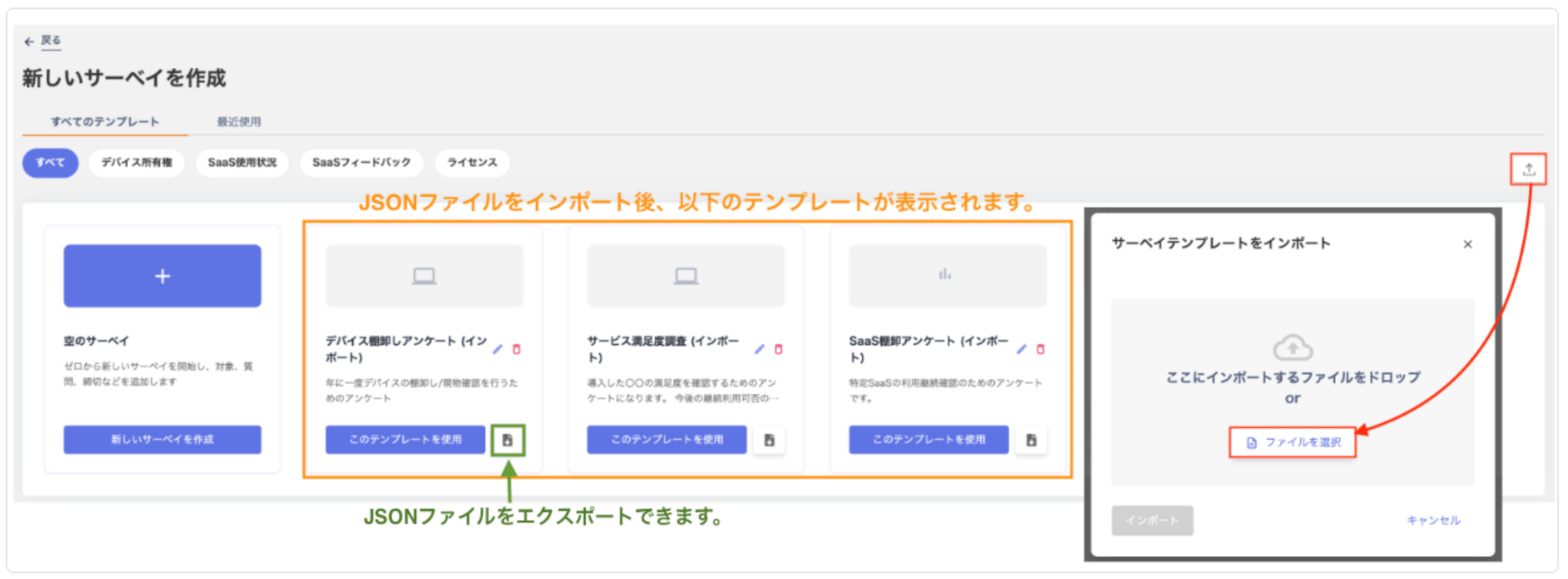
Go to Survey Creation > "Create New Survey" screen, click \[Import], and select a JSON file. The survey questions will be automatically generated. Export in JSON format is also supported.
If you have any questions or feedback, feel free to contact us.
We have launched the "Import/Export" feature for survey templates! By simply importing a template, you can now start internal surveys instantly.
## Benefits of This Feature
### 3 Ready-to-Use Standard Templates
We currently publish the following JSON files on the help page. Just download a template and import it to get started right away.
## How to Use
Go to Survey Creation > "Create New Survey" screen, click \[Import], and select a JSON file. The survey questions will be automatically generated. Export in JSON format is also supported.
If you have any questions or feedback, feel free to contact us.