> ## Documentation Index
> Fetch the complete documentation index at: https://hc.saas-manager.biz.nuro.jp/llms.txt
> Use this file to discover all available pages before exploring further.
# 2026/2/13 Release!!
> You can now trigger workflows immediately from the directory screen, and custom fields can be used as workflow execution conditions. This enables smoother operations for everything from day-to-day employee management to automating routine tasks.


 ## Trigger Workflows Immediately from the Directory Screen
You can now trigger workflows for specific employees directly from the directory screen. This is ideal for tasks that need immediate action, such as account provisioning or deletion when someone joins or leaves unexpectedly.
### Benefits
**Faster operations**: Launch related workflows while viewing user information.
**Perfect for urgent situations**: Highly effective for time-sensitive tasks like account provisioning or deletion triggered by sudden onboarding or offboarding.
### How to Use
Configure this from the directory screen by selecting **Run Workflow**.
For details, please refer to "Triggering a Workflow Immediately (Directory Screen)".
## Custom Fields Now Available as Workflow Execution Conditions
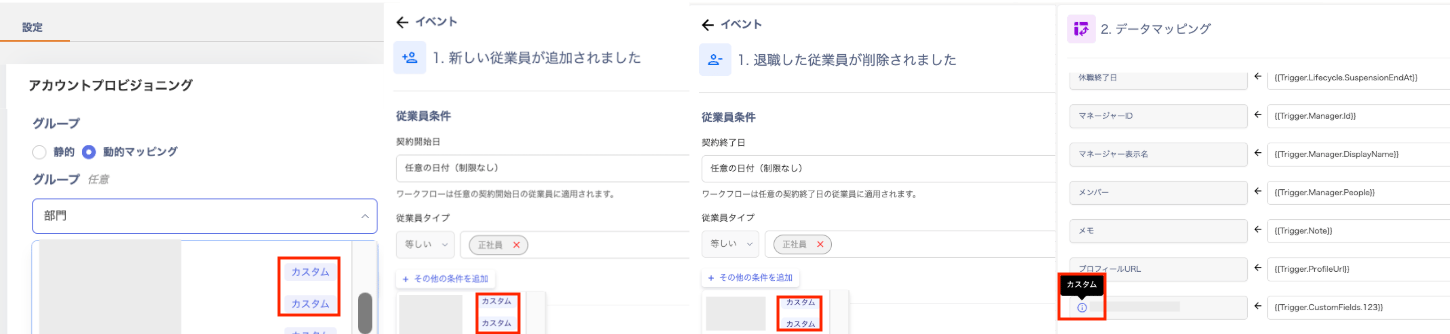
Custom management fields you have configured in the directory can now be used in SaaS attribute settings and workflows. This enables you to build workflows tailored to your organization's unique operations.
### Benefits
**Service connection settings**: Custom fields are now selectable in dynamic mapping when creating accounts. Custom fields can be flexibly assigned to roles or groups on the SaaS side.
**Workflow builder**: In the workflow builder screen, custom fields can now be set as "execution conditions (triggers)" or as "data mapping sources."
### How to Use
Configure this from **Automation** > **Services** tab > **Account Provisioning** in the settings screen, or from **Automation** > **Automation** tab > Workflow **Builder**.
For details, please refer to "Using Directory Custom Fields in Workflows."
If you have any questions or requests, please feel free to contact us through our support channel.
## Trigger Workflows Immediately from the Directory Screen
You can now trigger workflows for specific employees directly from the directory screen. This is ideal for tasks that need immediate action, such as account provisioning or deletion when someone joins or leaves unexpectedly.
### Benefits
**Faster operations**: Launch related workflows while viewing user information.
**Perfect for urgent situations**: Highly effective for time-sensitive tasks like account provisioning or deletion triggered by sudden onboarding or offboarding.
### How to Use
Configure this from the directory screen by selecting **Run Workflow**.
For details, please refer to "Triggering a Workflow Immediately (Directory Screen)".
## Custom Fields Now Available as Workflow Execution Conditions
Custom management fields you have configured in the directory can now be used in SaaS attribute settings and workflows. This enables you to build workflows tailored to your organization's unique operations.
### Benefits
**Service connection settings**: Custom fields are now selectable in dynamic mapping when creating accounts. Custom fields can be flexibly assigned to roles or groups on the SaaS side.
**Workflow builder**: In the workflow builder screen, custom fields can now be set as "execution conditions (triggers)" or as "data mapping sources."
### How to Use
Configure this from **Automation** > **Services** tab > **Account Provisioning** in the settings screen, or from **Automation** > **Automation** tab > Workflow **Builder**.
For details, please refer to "Using Directory Custom Fields in Workflows."
If you have any questions or requests, please feel free to contact us through our support channel.