> ## Documentation Index
> Fetch the complete documentation index at: https://hc.saas-manager.biz.nuro.jp/llms.txt
> Use this file to discover all available pages before exploring further.
# 2026/2/27 Release!!
> We have significantly enhanced the flexibility of the automation feature, adding more granular condition settings for workflow building and an automatic retry function for provisioning failures. This enables fine-tuned automation tailored to your organization's requirements and improves operational stability.

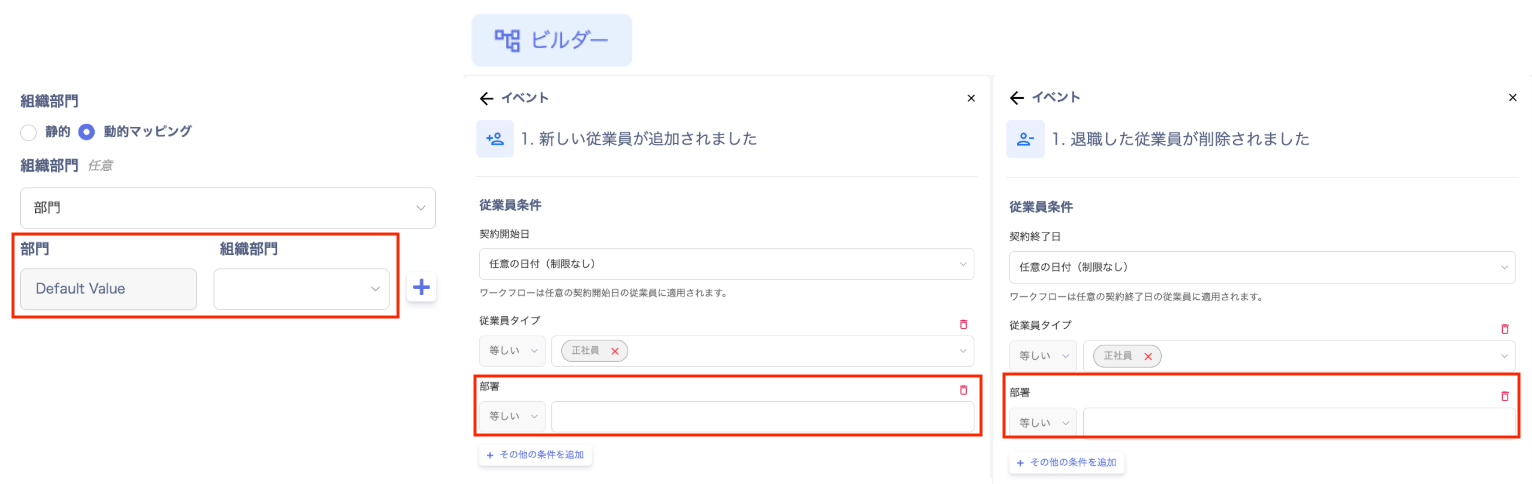 This update enhances the flexibility of the automation feature. In addition to more granular condition settings for workflow building, we have added a retry function to improve operational stability.
## More Granular Automation Conditions Enable Flexible Workflow Building
The freedom of condition settings in the workflow builder and per-SaaS configurations has been improved. This allows you to build finely tuned workflows tailored to each department and role within your organization. More complex business requirements can now be handled, greatly expanding the scope of automation.
**Example use case**: Conditions such as Department = Sales can now be specified, enabling fine-grained automation like "automatically create a HubSpot account when a sales team member is added."
## Automatic Retry on Provisioning Failure
We have implemented a feature that automatically retries provisioning when it fails due to unexpected communication errors during automation process execution.
**Improved reliability**: Reduces the effort of "manual re-execution."
**Stable operation**: Increases success rates and reduces the burden on administrators monitoring logs.
## How to Use
You can configure this in Automation > "Services" tab > Per-SaaS settings > Account Provisioning, and in Automation > "Automation" tab > Workflow Builder employee conditions.
For details, please refer to Automation Pre-configuration (Mapping), Setting Up Onboarding Workflows, and Setting Up Offboarding Workflows.
If you have any questions or requests, please feel free to contact our support team.
This update enhances the flexibility of the automation feature. In addition to more granular condition settings for workflow building, we have added a retry function to improve operational stability.
## More Granular Automation Conditions Enable Flexible Workflow Building
The freedom of condition settings in the workflow builder and per-SaaS configurations has been improved. This allows you to build finely tuned workflows tailored to each department and role within your organization. More complex business requirements can now be handled, greatly expanding the scope of automation.
**Example use case**: Conditions such as Department = Sales can now be specified, enabling fine-grained automation like "automatically create a HubSpot account when a sales team member is added."
## Automatic Retry on Provisioning Failure
We have implemented a feature that automatically retries provisioning when it fails due to unexpected communication errors during automation process execution.
**Improved reliability**: Reduces the effort of "manual re-execution."
**Stable operation**: Increases success rates and reduces the burden on administrators monitoring logs.
## How to Use
You can configure this in Automation > "Services" tab > Per-SaaS settings > Account Provisioning, and in Automation > "Automation" tab > Workflow Builder employee conditions.
For details, please refer to Automation Pre-configuration (Mapping), Setting Up Onboarding Workflows, and Setting Up Offboarding Workflows.
If you have any questions or requests, please feel free to contact our support team.