> ## Documentation Index
> Fetch the complete documentation index at: https://hc.saas-manager.biz.nuro.jp/llms.txt
> Use this file to discover all available pages before exploring further.
# 2026/4/10 Release!!
> When automatically syncing users via SCIM, you can now choose whether to send an invitation email to newly added users. The setting can be configured flexibly to match your workflow.
 Thank you for using our service. This update introduces new features that improve convenience and security for SCIM integration.
When syncing users from an Identity Provider (IdP) via SCIM, you can now choose whether to send an **invitation email**. This choice applies to newly added, automatically synced users.
Previously, an invitation email was sent automatically at the same time a user was created. Going forward, this can be configured flexibly to suit your workflow.
## When This Is Useful
## How to Configure
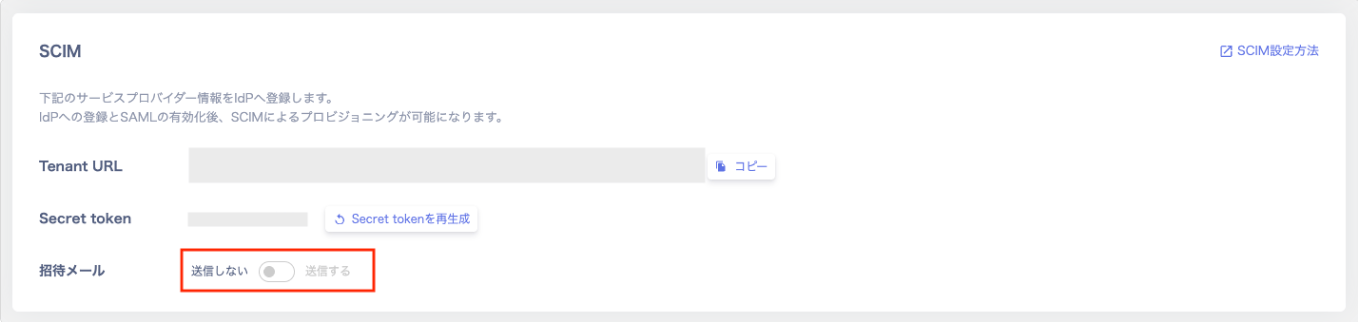
Go to Settings > Security > SCIM > click **\[Regenerate Secret Token]** under Secret token, then configure the setting.
Invitation email setting: Toggle the switch shown under **"Invitation Email"**.
* **Do not send**: The user is created, but no invitation email is sent.
* **Send**: An invitation email is automatically sent to the service at the same time the user is created.
For setup instructions, please refer to the SCIM invitation email configuration guide.
If you have any questions or requests, please feel free to contact us through our support channel.
Thank you for using our service. This update introduces new features that improve convenience and security for SCIM integration.
When syncing users from an Identity Provider (IdP) via SCIM, you can now choose whether to send an **invitation email**. This choice applies to newly added, automatically synced users.
Previously, an invitation email was sent automatically at the same time a user was created. Going forward, this can be configured flexibly to suit your workflow.
## When This Is Useful
## How to Configure
Go to Settings > Security > SCIM > click **\[Regenerate Secret Token]** under Secret token, then configure the setting.
Invitation email setting: Toggle the switch shown under **"Invitation Email"**.
* **Do not send**: The user is created, but no invitation email is sent.
* **Send**: An invitation email is automatically sent to the service at the same time the user is created.
For setup instructions, please refer to the SCIM invitation email configuration guide.
If you have any questions or requests, please feel free to contact us through our support channel.