> ## Documentation Index
> Fetch the complete documentation index at: https://hc.saas-manager.biz.nuro.jp/llms.txt
> Use this file to discover all available pages before exploring further.
# 1-1. How Shadow IT Detection Works with Google Workspace (Reference)
> Learn what Shadow IT means.
Our service detects cases where employees use SaaS applications without the company's knowledge — commonly referred to as Shadow IT. This article explains how to detect Shadow IT using Google Workspace.
## What Is Shadow IT?
In a broad sense, Shadow IT can include employees using consumer tools like LINE or Messenger for work. In the context of our service, Shadow IT refers to SaaS applications that are not officially approved as company tools.
### How Shadow IT Detection Works with Google Workspace
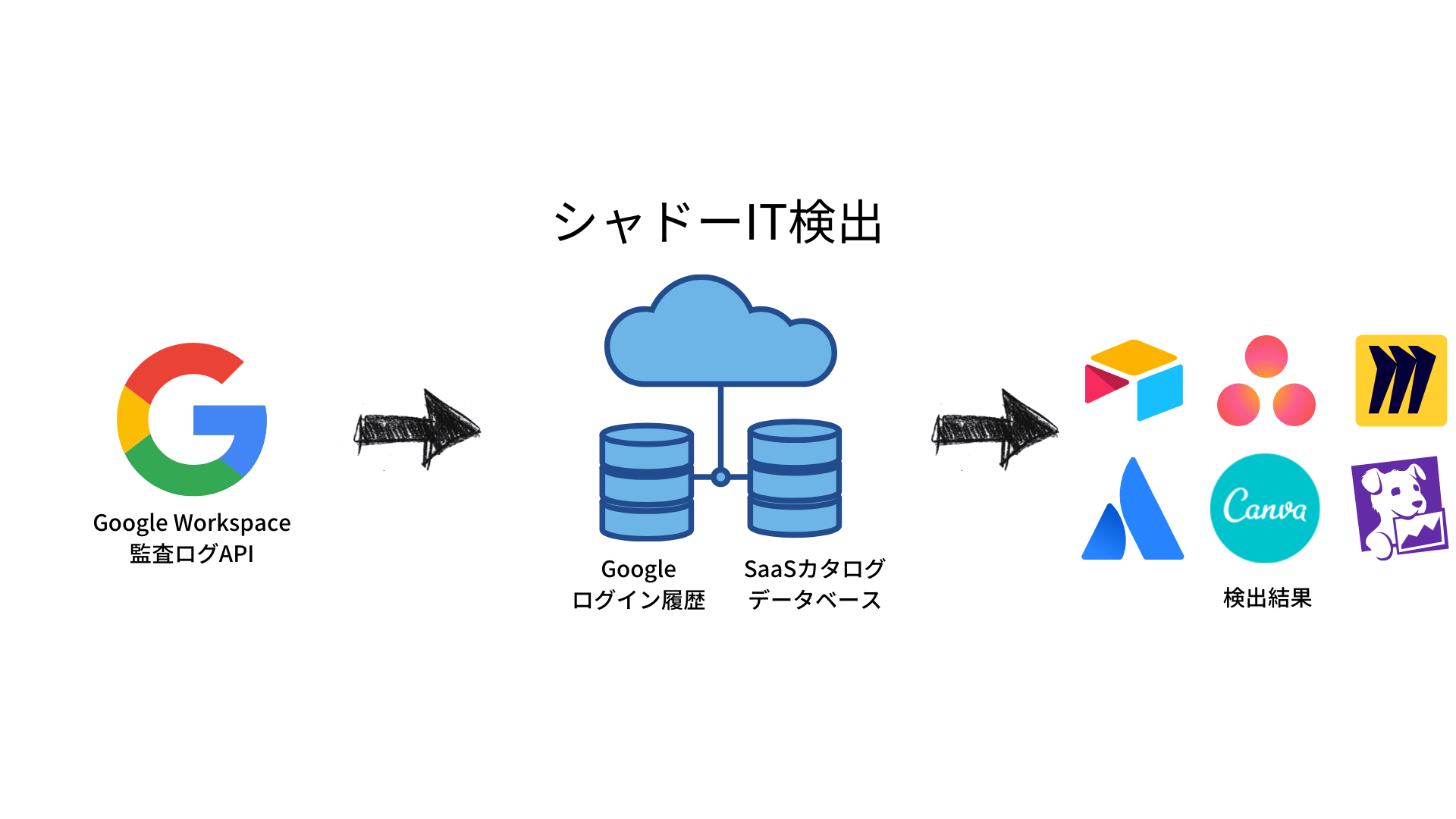 When you connect Google Workspace, you can detect Shadow IT using the history of **Google Login (Google OAuth)** events.
The service identifies which SaaS applications employees logged into by analyzing those login records.
### Prerequisites
* Google Workspace must be connected.
* Employees must use a Google Login with an email address registered in the connected Google Workspace to sign in to SaaS applications.
### How It Works
1. The service periodically calls the Google Audit Log API to retrieve login history data.
2. It cross-references the data against its SaaS catalog database to detect and aggregate SaaS usage.
3. SaaS applications not yet connected appear under **Shadow IT**.
### Behavior on Initial Connection
The audit log can contain large amounts of data. On the initial connection, the service collects data gradually as follows. (For organizations with extensive SaaS usage, logs can reach hundreds of millions of records.)
1. Data collection begins immediately after connecting. The service first retrieves and aggregates one week of data.
2. It gradually extends the target period and continues retrieving and aggregating data. (Retrieving and aggregating all data for the past three months from the initial connection may take a few hours to up to three days.)
3. It eventually collects three months of data in total.
4. After the initial collection, it updates detection results through regular incremental syncs.
### Checking Shadow IT
By connecting **Google Workspace**, the service detects SaaS applications from the history of **Google Login** activity using organizational accounts.
After 5–30 minutes from the connection, detected services appear under the **Shadow IT** tab.
You can export logs for all SaaS applications — including those not yet connected (\*1) — to CSV using the **Export** button in the upper right.
\*1) Data is aggregated based on up to the last three months. Application names are displayed exactly as they appear in the Google Workspace Admin console.
### Data Retention Period
On the initial connection, the service retrieves **three months of data**. After that, it continuously fetches new data and retains only the last-access record per service per user.
If you disconnect the integration and cancel your subscription, all data is deleted.
### When Services Are Not Detected
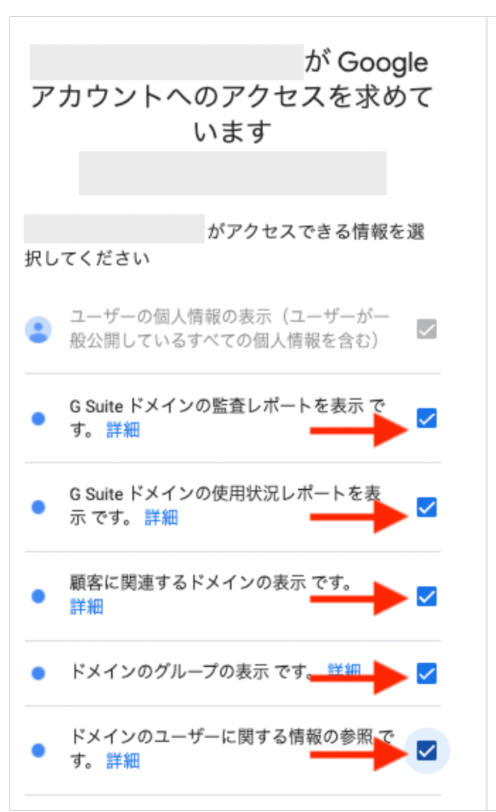
The Google Workspace user account used for the connection may have insufficient permissions. Check that the following items are visible and enabled.
If the required permissions are missing, add them to a custom admin role, or [reconnect](/en/it-management/saas-management/93nahw45is-trouble) using a super admin account.
* View audit reports for the Gsuite domain
* View usage reports for the Gsuite domain
When you connect Google Workspace, you can detect Shadow IT using the history of **Google Login (Google OAuth)** events.
The service identifies which SaaS applications employees logged into by analyzing those login records.
### Prerequisites
* Google Workspace must be connected.
* Employees must use a Google Login with an email address registered in the connected Google Workspace to sign in to SaaS applications.
### How It Works
1. The service periodically calls the Google Audit Log API to retrieve login history data.
2. It cross-references the data against its SaaS catalog database to detect and aggregate SaaS usage.
3. SaaS applications not yet connected appear under **Shadow IT**.
### Behavior on Initial Connection
The audit log can contain large amounts of data. On the initial connection, the service collects data gradually as follows. (For organizations with extensive SaaS usage, logs can reach hundreds of millions of records.)
1. Data collection begins immediately after connecting. The service first retrieves and aggregates one week of data.
2. It gradually extends the target period and continues retrieving and aggregating data. (Retrieving and aggregating all data for the past three months from the initial connection may take a few hours to up to three days.)
3. It eventually collects three months of data in total.
4. After the initial collection, it updates detection results through regular incremental syncs.
### Checking Shadow IT
By connecting **Google Workspace**, the service detects SaaS applications from the history of **Google Login** activity using organizational accounts.
After 5–30 minutes from the connection, detected services appear under the **Shadow IT** tab.
You can export logs for all SaaS applications — including those not yet connected (\*1) — to CSV using the **Export** button in the upper right.
\*1) Data is aggregated based on up to the last three months. Application names are displayed exactly as they appear in the Google Workspace Admin console.
### Data Retention Period
On the initial connection, the service retrieves **three months of data**. After that, it continuously fetches new data and retains only the last-access record per service per user.
If you disconnect the integration and cancel your subscription, all data is deleted.
### When Services Are Not Detected
The Google Workspace user account used for the connection may have insufficient permissions. Check that the following items are visible and enabled.
If the required permissions are missing, add them to a custom admin role, or [reconnect](/en/it-management/saas-management/93nahw45is-trouble) using a super admin account.
* View audit reports for the Gsuite domain
* View usage reports for the Gsuite domain