> ## Documentation Index
> Fetch the complete documentation index at: https://hc.saas-manager.biz.nuro.jp/llms.txt
> Use this file to discover all available pages before exploring further.
# 1-0. Discover Services (Shadow IT)
> By integrating with Google Workspace, you can detect cloud services used in your organization.
## What is Shadow IT Detection?
There are three methods for Shadow IT detection.
This page explains method ①, detection via Google Workspace. For methods ② and ③, see their respective pages.
1. Detection using sign-in logs
* [1-1. How Shadow IT Detection Works with Google Workspace (Reference)](/en/it-management/shadow-it/8nwq5urwh5-shadow-it)
* Google account / Microsoft account sign-ins, and Microsoft Entra ID sign-in logs
2. Detection using the [browser extension](/en/it-management/shadow-it/7q1wryx3dk-extension)
3. [Connect to the Cost Master](/en/it-management/tutorial/qk18kbsiv1-cost-master) to detect SaaS services from payment history
## View Shadow IT
After setting up SaaS integrations (for sign-in-based detection) or distributing the browser extension, detected services appear under Integrations > **Shadow IT**.
Among the [connectable SaaS](/en/integrations/ey32ki15er-function), any **not yet connected** appear under **Shadow IT**.
 ### Criteria for Shadow IT Review and Management
**Shadow IT** displays SaaS services that are not yet connected. Use the following criteria to prioritize them, then connect them via [3. Connect Your SaaS!](/en/it-management/tutorial/tdxtlisu9v-4).
| Criterion | Details |
| -------------------- | ---------------------------------------------------------------------------------------------------------------------- |
| Information priority | Give top priority to SaaS that handles personal data or highly confidential information. |
| Leakage risk | Prioritize SaaS with numerous users or accounts, or SaaS that uses AI, as these carry a higher risk of data spreading. |
## Export as CSV
Click **Export** in the upper right to export the detected SaaS list.
### Criteria for Shadow IT Review and Management
**Shadow IT** displays SaaS services that are not yet connected. Use the following criteria to prioritize them, then connect them via [3. Connect Your SaaS!](/en/it-management/tutorial/tdxtlisu9v-4).
| Criterion | Details |
| -------------------- | ---------------------------------------------------------------------------------------------------------------------- |
| Information priority | Give top priority to SaaS that handles personal data or highly confidential information. |
| Leakage risk | Prioritize SaaS with numerous users or accounts, or SaaS that uses AI, as these carry a higher risk of data spreading. |
## Export as CSV
Click **Export** in the upper right to export the detected SaaS list.
 The exported CSV file contains the following fields. The filename format is `recommended-services__.csv`.
| Field | Description |
| -------------------------- | --------------------------------------------------------------------- |
| **Service Name** | Displays the app name. |
| **Number of Active Users** | Total unique users (email addresses) detected since monitoring began. |
| **Last Accessed AT(UTC)** | Displays the most recent access time in UTC. |
| **Most Recent Employees** | Shows up to 10 email addresses of the most recently active users. |
| **Most Common Domains** | Outputs the most frequently used domain name for each detected SaaS. |
| **Data Source** | The method used to detect the service. |
## FAQ
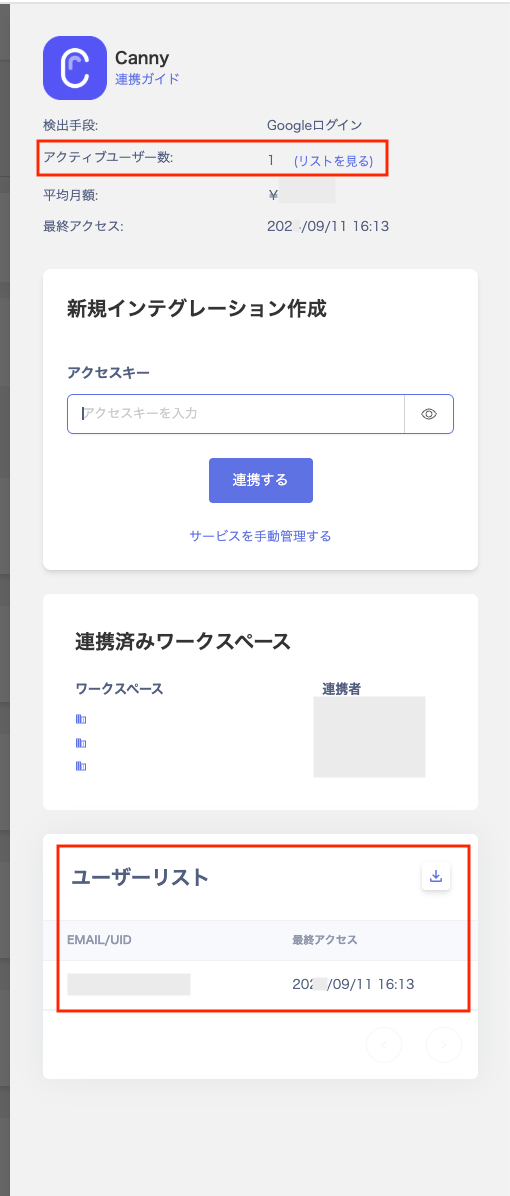
**Q. The active user count shown after clicking a SaaS in Shadow IT does not match the user list.**
A. The active user count is retrieved from event logs for the past 3 months. Users from before that period do not appear in the list.
The exported CSV file contains the following fields. The filename format is `recommended-services__.csv`.
| Field | Description |
| -------------------------- | --------------------------------------------------------------------- |
| **Service Name** | Displays the app name. |
| **Number of Active Users** | Total unique users (email addresses) detected since monitoring began. |
| **Last Accessed AT(UTC)** | Displays the most recent access time in UTC. |
| **Most Recent Employees** | Shows up to 10 email addresses of the most recently active users. |
| **Most Common Domains** | Outputs the most frequently used domain name for each detected SaaS. |
| **Data Source** | The method used to detect the service. |
## FAQ
**Q. The active user count shown after clicking a SaaS in Shadow IT does not match the user list.**
A. The active user count is retrieved from event logs for the past 3 months. Users from before that period do not appear in the list.