> ## Documentation Index
> Fetch the complete documentation index at: https://hc.saas-manager.biz.nuro.jp/llms.txt
> Use this file to discover all available pages before exploring further.

# 1. Survey Screen Overview

> Learn how to navigate and use the survey screens.

<Info>
  All operations in this feature require **Admin** permission or the **Survey Manager** role. Viewing requires **Member** permission or the **Survey Viewer** role. For details, see [Basic Roles](/en/it-management/settings/yne7fl2lcy-role-new#basic-roles).
  To use the target type "Device," you must separately enable the "Device" feature.
</Info>

This page explains each item and function on the survey screens.

#### Screen Overview (Survey)

<img src="https://mintcdn.com/admina-sbn/PEEndzio9f5-afJr/images/it-management/f0f1hd50lx/2025-10-07-8-54-50.png?fit=max&auto=format&n=PEEndzio9f5-afJr&q=85&s=ecb52f7f8eb828d6092ff0b105f9e704" alt="Screen overview (Survey)" width="2592" height="1030" data-path="images/it-management/f0f1hd50lx/2025-10-07-8-54-50.png" />

<table>
  <thead><tr><th style={{width:"60px"}}>No.</th><th>Item</th><th>Description</th></tr></thead>

  <tbody>
    <tr><td>1</td><td>**Dashboard**</td><td>View "Total / Sending / Draft / Scheduled / Average Response Rate."</td></tr>
    <tr><td>2</td><td>**Search and filter**</td><td>Search surveys or filter by status or date range.</td></tr>
    <tr><td>3</td><td>**Create survey**</td><td>Click **\[+]** to create a new survey.</td></tr>
    <tr><td>4</td><td>**Survey list**</td><td>Click a survey in the list to view its details.</td></tr>
    <tr><td>5</td><td>**More options**</td><td>Click the three-dot menu **\[︙]** to choose from "Edit / Duplicate / Export / Schedule / Complete / Delete / Cancel." Drafts and completed surveys shown in the list can be deleted.</td></tr>
  </tbody>
</table>

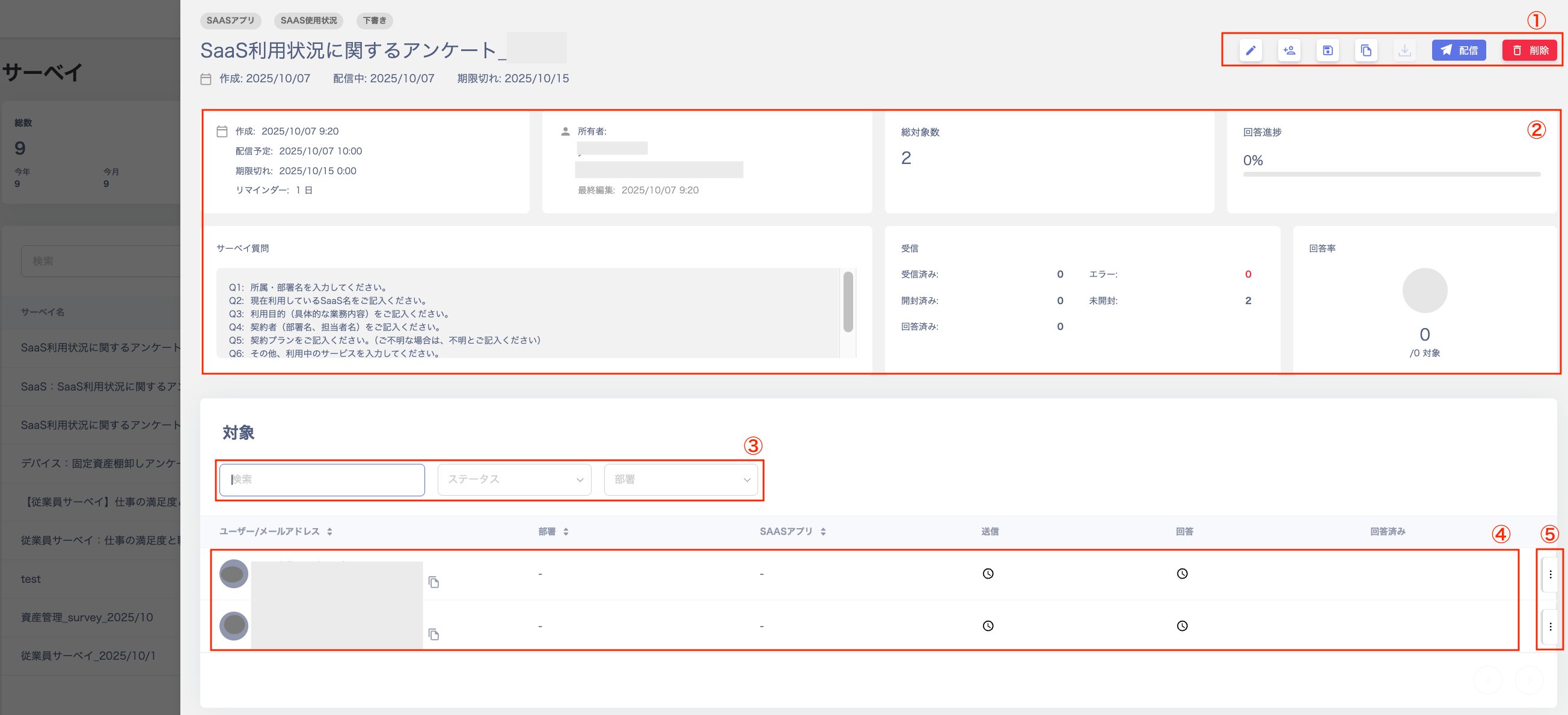
#### Survey Detail Screen

<img src="https://mintcdn.com/admina-sbn/PEEndzio9f5-afJr/images/it-management/f0f1hd50lx/2025-10-07-9-21-21.png?fit=max&auto=format&n=PEEndzio9f5-afJr&q=85&s=f64479da8cea415fd961e74bede68e06" alt="Survey detail screen" width="2608" height="1190" data-path="images/it-management/f0f1hd50lx/2025-10-07-9-21-21.png" />

<table>
  <thead><tr><th style={{width:"60px"}}>No.</th><th>Item</th><th>Description</th></tr></thead>

  <tbody>
    <tr><td>1</td><td>**Action buttons**</td><td>Buttons in the upper right — "Edit / Save as Template / Duplicate / Export / Send / Cancel / Start Now."</td></tr>
    <tr><td>2</td><td>**Dashboard**</td><td>View "Content / Owner / Total Targets / Response Progress / Survey Questions / Received / Response Rate."</td></tr>
    <tr><td>3</td><td>**Search and filter**</td><td>Search or filter by status or department.</td></tr>
    <tr><td>4</td><td>**Target list**</td><td>View the list of targets configured in the "Target Settings" screen during survey creation.</td></tr>
    <tr><td>5</td><td>**More options**</td><td>Click the three-dot menu **\[︙]** to select "Resend."</td></tr>
  </tbody>
</table>

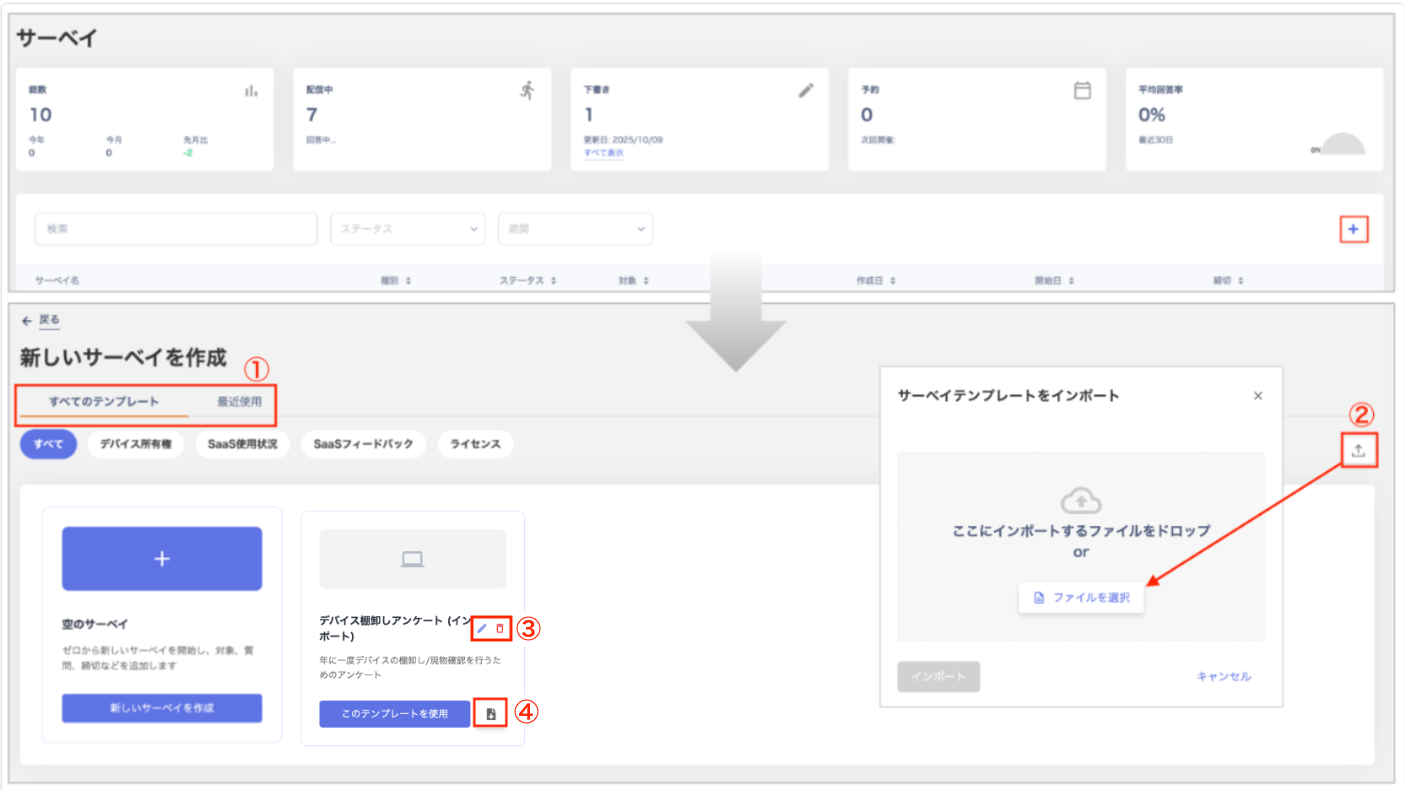
<h4 id="create-survey-screen">
  Create New Survey Screen
</h4>

<img src="https://mintcdn.com/admina-sbn/PEEndzio9f5-afJr/images/it-management/f0f1hd50lx/2026-01-28-9-33-44.png?fit=max&auto=format&n=PEEndzio9f5-afJr&q=85&s=c33fd9a6dc223afa97b4b9143e5d0843" alt="Create new survey screen" width="1404" height="790" data-path="images/it-management/f0f1hd50lx/2026-01-28-9-33-44.png" />

<table>
  <thead><tr><th style={{width:"60px"}}>No.</th><th>Item</th><th>Description</th></tr></thead>

  <tbody>
    <tr><td>1</td><td>**Switch templates**</td><td>Toggle between "All Templates / Recently Used." You can also filter templates by category: "All / Device Owner / SaaS Usage / SaaS Feedback / License."</td></tr>
    <tr><td>2</td><td>**Import**</td><td>Import a survey template from the "Import Survey Template" screen. For details, see [Importing a Template](/en/it-management/survey/cx52fc8kov-2-4#import-template).</td></tr>
    <tr><td>3</td><td>**Edit / Delete**</td><td>Edit or delete templates you created by importing from the "Create New Survey" screen.</td></tr>
    <tr><td>4</td><td>**Export**</td><td>Export (JSON) templates you created by importing from the "Create New Survey" screen. You can also export and save any edits you make.</td></tr>
  </tbody>
</table>