> ## Documentation Index
> Fetch the complete documentation index at: https://hc.saas-manager.biz.nuro.jp/llms.txt
> Use this file to discover all available pages before exploring further.
# サイボウズ Office
> サイボウズとの連携の手順です。
## サポートする機能
アカウント作成 アカウント削除
連携には共通管理者のメールアドレスとパスワードが必要です。
サイボウズOfficeとの連携では、Cybozu Officeのユーザーのみを取得します。
全てのアカウントを取得する連携は「cybozu.com 共通管理」で連携してください。
## 連携方法
以下の連携方法で連携いただけます。
* ID/Passwordでの連携
* APIでの連携
## 事前準備
### ID/Passwordで連携する場合
**2FA(2要素認証)をご利用の場合**
ID/Passwordによる連携で、[2 要素認証](https://jp.cybozu.help/general/ja/id/02042.html)を有効にしたユーザーでは、パスワード認証で REST API を実行できません。
2要素認証を無効にした連携用アカウントをご用意ください。
詳細は[2要素認証を設定している場合(外部サイト)](https://cybozu.dev/ja/common/docs/user-api/overview/authentication/#2fa)をご参照ください。
#### サイボウズへのログイン方法
[サイボウズ ログインページ](https://www.cybozu.com/jp/login/)または、ご利用のサイボウズのサブドメインから共通の管理者権限のメールアドレス・パスワードを入力し、ログインします。
 [SAML認証を回避するURL(外部サイト)](https://jp.kintone.help/general/ja/admin/list_saml/saml_restriction#list_saml_saml_restriction_20)
「SAML認証の使用を必須にする」を有効にしていても、cybozu.com共通管理者だけはパスワード認証を利用してcybozu.comにログインできます。
#### ワークスペースキーの取得方法
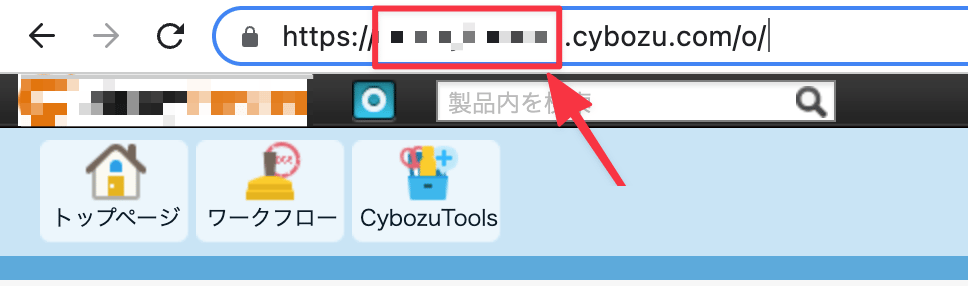
サイボウズにログイン後、URLの一部が**ワークスペースキー**となるので、保存しておきます。
`https://{ワークスペースキー}.cybozu.com/o/`
[SAML認証を回避するURL(外部サイト)](https://jp.kintone.help/general/ja/admin/list_saml/saml_restriction#list_saml_saml_restriction_20)
「SAML認証の使用を必須にする」を有効にしていても、cybozu.com共通管理者だけはパスワード認証を利用してcybozu.comにログインできます。
#### ワークスペースキーの取得方法
サイボウズにログイン後、URLの一部が**ワークスペースキー**となるので、保存しておきます。
`https://{ワークスペースキー}.cybozu.com/o/`
 ### APIで連携する場合
#### APIキーの取得方法
1. cybozu.com共通管理 > 外部連携 > APIトークン > **APIトークンを生成** をクリックします。
### APIで連携する場合
#### APIキーの取得方法
1. cybozu.com共通管理 > 外部連携 > APIトークン > **APIトークンを生成** をクリックします。
 2. **Read and Write** にチェックを入れ、**生成**をクリックします。
生成された**APIキー**をコピーします。
2. **Read and Write** にチェックを入れ、**生成**をクリックします。
生成された**APIキー**をコピーします。
 ## インテグレーションのセットアップ
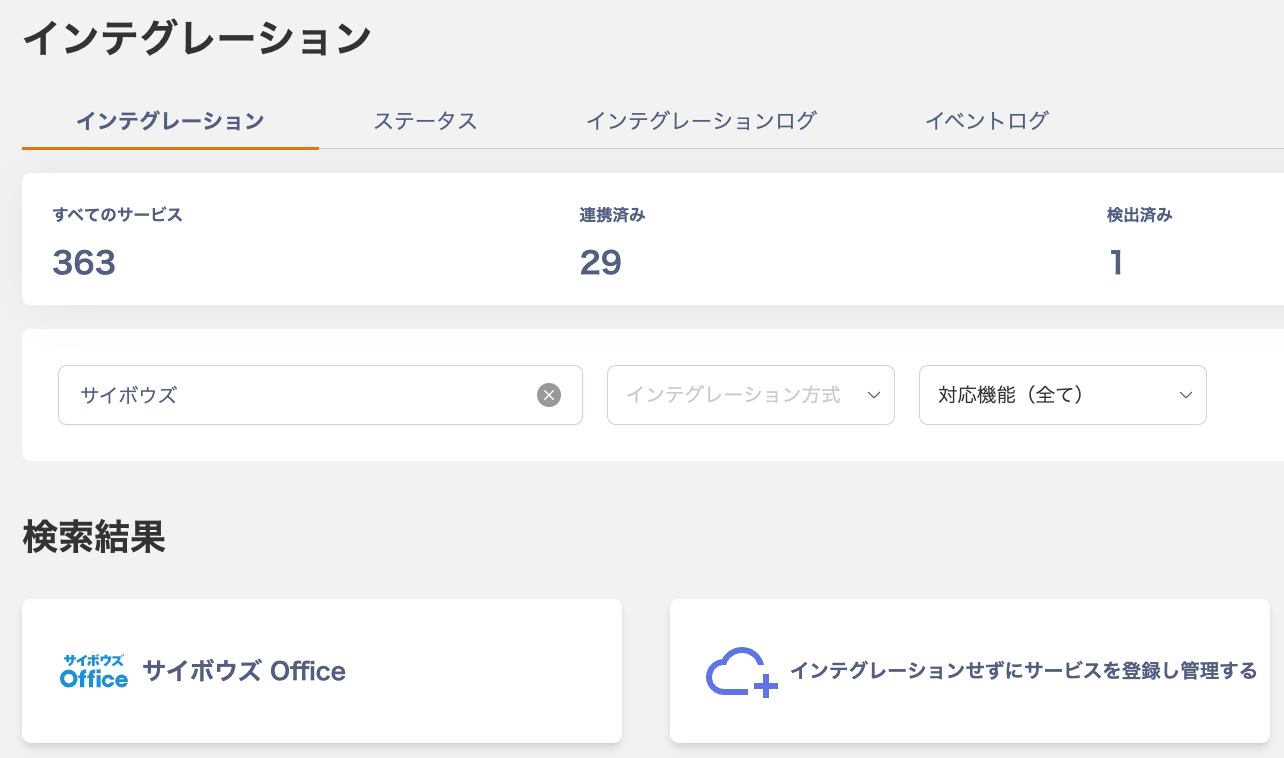
1. Adminaのインテグレーション画面にて、**サイボウズ Office** で検索します。
## インテグレーションのセットアップ
1. Adminaのインテグレーション画面にて、**サイボウズ Office** で検索します。
 ### ID/Passwordによる連携
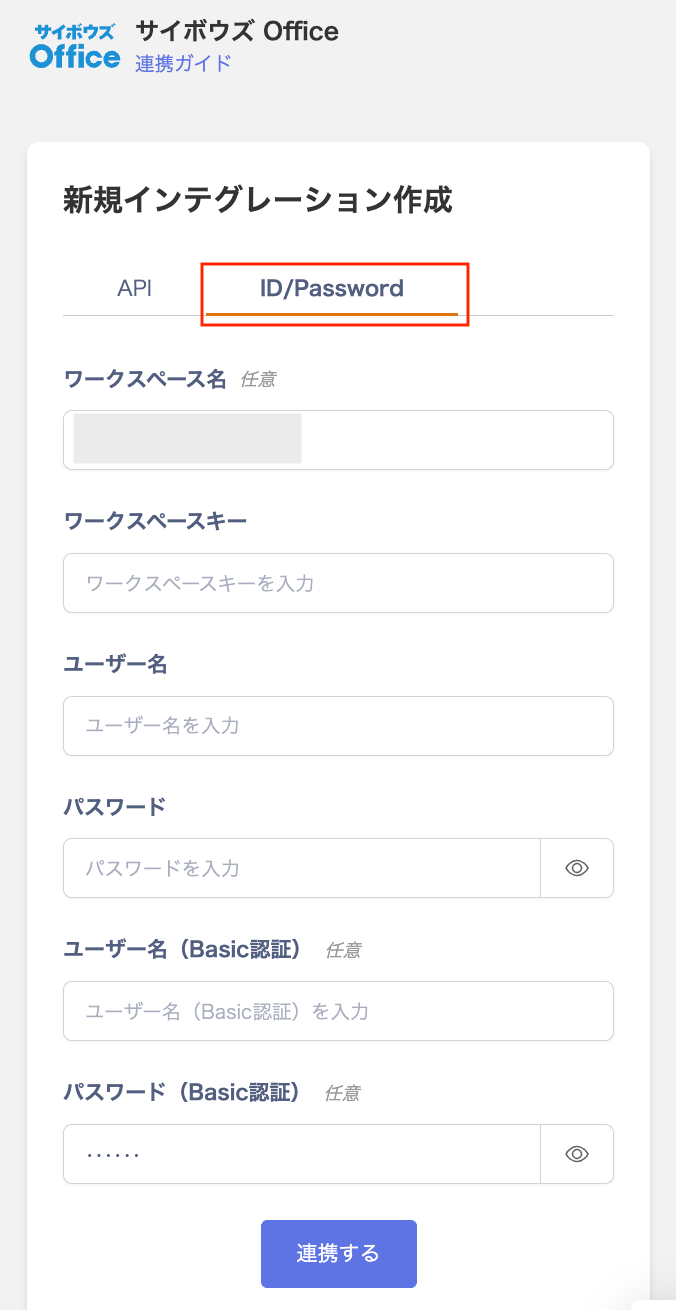
\[ID/Password]タブをクリックし、任意の**ワークスペース名**、前の手順で取得した**ワークスペースキー**、**共通管理者のメールアドレスとパスワード**を入力し、**連携する**をクリックします。
Basic認証を設定している場合は、**Basic認証のログイン名とパスワード**も入力してください。
### ID/Passwordによる連携
\[ID/Password]タブをクリックし、任意の**ワークスペース名**、前の手順で取得した**ワークスペースキー**、**共通管理者のメールアドレスとパスワード**を入力し、**連携する**をクリックします。
Basic認証を設定している場合は、**Basic認証のログイン名とパスワード**も入力してください。
 ### APIによる連携
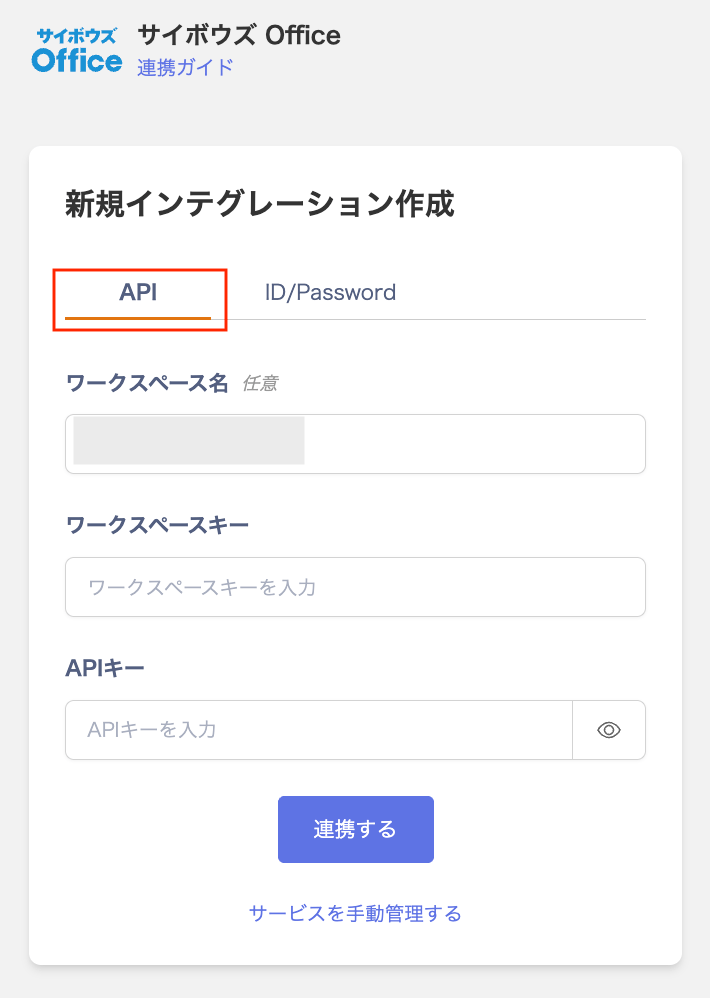
\[API]タブで、前の手順で取得した**ワークスペースキー、APIキー**を入力し、**連携する**をクリックします。
### APIによる連携
\[API]タブで、前の手順で取得した**ワークスペースキー、APIキー**を入力し、**連携する**をクリックします。
 ## 連携の確認
サイボウズ Officeとの連携に成功すると、アカウント一覧に登録済みのユーザー情報が表示されます。
正常に完了しない場合は、インテグレーション画面のステータスタブから**編集**し、再度連携をお試しください。
解決しない場合はチャットにてお問い合わせください🙏
サイボウズの連携概要については[連携ページ](http://admina.moneyforward.com/jp/integrations/cybozu)をご覧ください。
## 連携の確認
サイボウズ Officeとの連携に成功すると、アカウント一覧に登録済みのユーザー情報が表示されます。
正常に完了しない場合は、インテグレーション画面のステータスタブから**編集**し、再度連携をお試しください。
解決しない場合はチャットにてお問い合わせください🙏
サイボウズの連携概要については[連携ページ](http://admina.moneyforward.com/jp/integrations/cybozu)をご覧ください。