

About Audit Logs
The audit log records operations performed in the service. This includes important actions and changes executed within the system. Note that detailed change histories for data are not included in this log. The log tracks actions performed by users and the system, and it is used for security audits and compliance purposes. It records not only user actions but also system operations (such as automatic sync) and API calls. For operations performed on connected SaaS services, refer to the Integration Log in the Integrations menu.How to Retrieve Audit Logs
You can retrieve audit logs in the following ways:- Settings menu > Audit Log tab
- Export as a CSV file with specified conditions
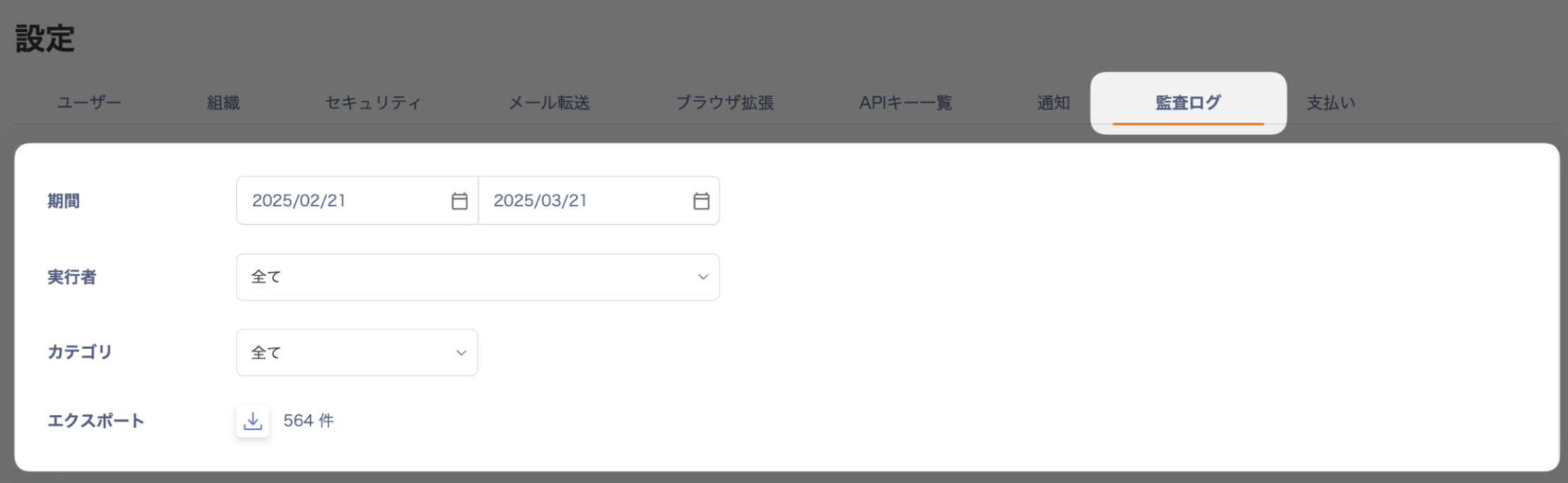
Log Retention Period
This audit log is recorded as an operation log for both customers and our company. Logs are retained for a period of three years.Types of Audit Logs
The audit log primarily stores records of write operations. Read-only actions (such as viewing a page) are not included. Data exports are included. Audit logs are classified into the following categories:| Category | Example Operations |
|---|---|
| Device-related | Create, update, or delete devices Create, update, or delete device usage history Create, update, or delete device custom fields, etc. |
| Service-related | Create or delete service accounts Create, update, or delete workspaces Sync workspaces, etc. |
| Directory-related | Create, update, or delete directories Merge or separate accounts Create, update, or delete custom fields, etc. |
| Contract-related | Create, update, or delete service contracts Create, update, or delete reminders, etc. |
| Other | Manage file permissions Manage API keys Manage SAML settings Login history, etc. |
Reading the Exported Data (CSV)
Standard Columns
Basic information included in all audit logs:| Field Name | Description |
|---|---|
| actorType | The type of actor that performed the action (user, system, api) |
| actorName | The name of the user who performed the action |
| description | The content of the action |
| actionTime (UTC) | The time the action was performed (UTC) |
| result | The result of the action (Success/Failure) |
| resultReason | The reason for failure, if applicable |
| category | The category of the action |
| activity | The specific action performed |
| ipAddress | The IP address from which the action originated |
| userAgent | The user agent from which the action originated |
Additional Columns
Depending on the type of action, the following additional columns may appear:-
For device-related actions
- device ID / device Name: information about the target device
- deviceHistory ID / deviceHistory Name: information about device usage history
- deviceCustomField ID / deviceCustomField Name: information about custom fields, etc.
-
For service-related actions
- service ID / service Name: information about the target service
- serviceAccount ID / serviceAccount Name: information about the service account
- workspace ID / workspace Name: information about the workspace, etc.
-
For directory-related actions
- identity ID / identity Name: information about the directory
- people ID / people Name: information about the account
- identityCustomField ID / identityCustomField Name: information about custom fields, etc.
- If a single action involves multiple targets, additional columns are added for each target.
When you export multiple categories or actions into a single file, additional columns are appended to the right.
Sample Data
The following is sample data: