Alerts for Services
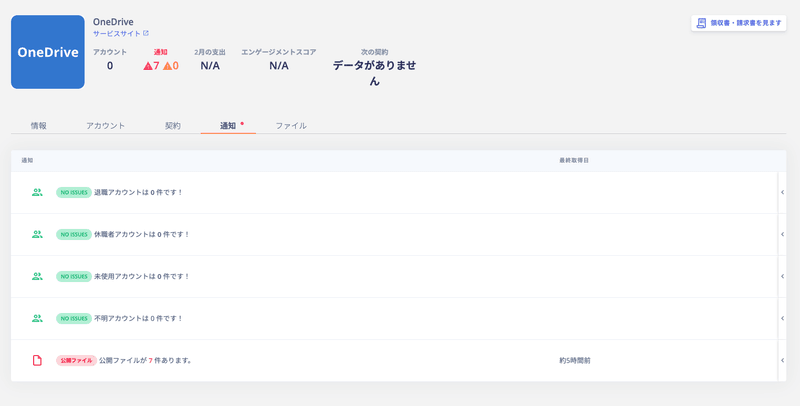
There are five types of alerts for services.| Alert | Description |
|---|---|
| Resigned accounts | Notifies accounts with the “Resigned” status. |
| Leave of absence accounts | Notifies accounts with the “Leave of absence” status. |
| Unused accounts | Notifies accounts whose last activity date was 45 days or more ago. |
| Unknown accounts | Notifies accounts with the “Unknown” status. |
| Public files | Notifies about files shared with everyone. For more on managing public files, see External Shared Content Management. |
For the criteria used to determine each status, see the Status Determination Criteria: Quick Reference.
Exporting Alerts
You can export accounts and services with active alerts from the Service screen or the Directory screen.Service Screen
Select a SaaS > Notifications, then click the notification to export. Use the export button in the upper right to download it as a CSV file.
| No. | Item | Description |
|---|---|---|
| 1 | Search and filter | Search by name or email address, and filter by workspace or notification type using the dropdowns. |
| 2 | Sync | Click Sync to manually trigger a sync. |
| 3 | Export | Export the accounts listed in the notifications for each service. |
Directory Screen
Go to Notifications in the upper right > Show all → > Warnings, then click the account to export. Use the export button in the upper right to download it as a CSV file.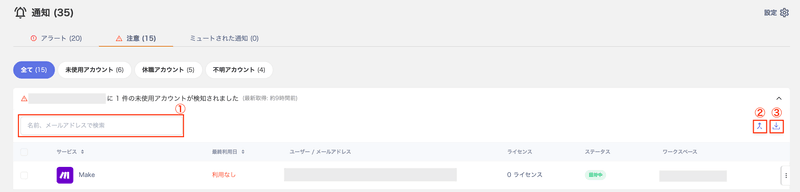
| No. | Item | Description |
|---|---|---|
| 1 | Search by name or email address | Search for accounts shown in notifications by name or email address. |
| 2 | Merge | Button to merge accounts. For details, see Linking (Merging) Accounts. |
| 3 | Export | Export the SaaS and account information shown in notifications for each account. |
Slack Alert Notifications
Some notifications can be sent to a Slack channel. For details, see Send Alerts via Slack.Stopping Alert Notifications
To stop a notification, click Stop to mute the alert. For details, see Stop (Mute) Alert Notifications.Enabling/Disabling All Alert Notifications
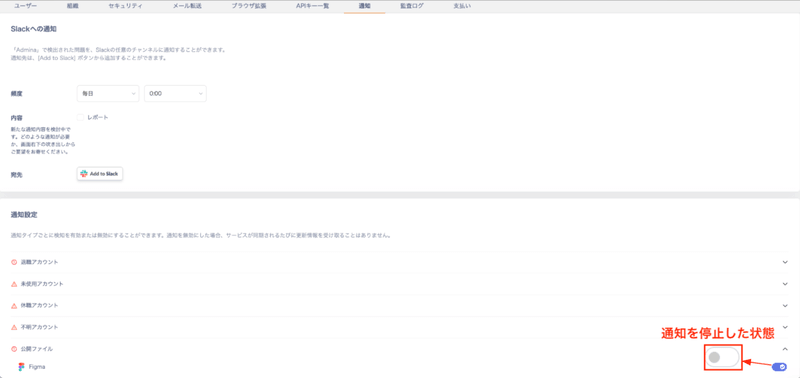
Go to Settings > Notifications to enable or disable all alert notifications at once. The Settings menu is only visible to accounts with Admin privileges. On the Notification Settings screen, turn off the toggle switch for each notification type you want to disable.