

Key specifications
- Data is available from February 25, 2022, when this feature was introduced.
- The UI displays logs for the past 3 months.
- Logs for disconnected integrations are not currently included.
- Logs are retained even after an integration is disconnected.
View logs
You can view logs in the integration log and status views.Integration log
Under Integration, select Integration Log.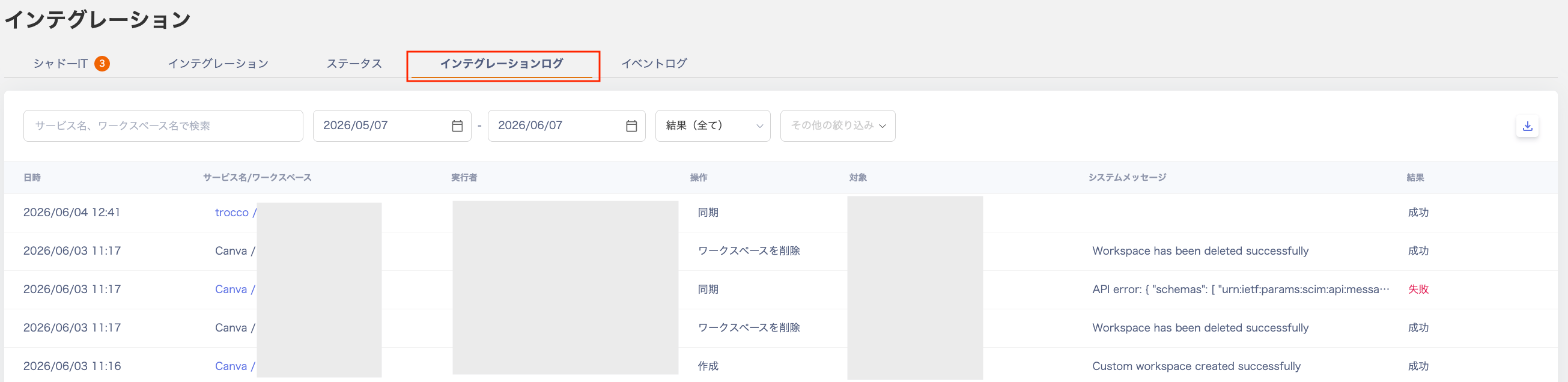
Displayed fields
| Field | Description |
|---|---|
| Date/Time | Shows the date and time of each operation. You can specify a start and end date range. |
| Service name / Workspace | Shows the target cloud service and workspace name. |
| Executed by | Shows the email address of the user who performed the operation. |
| Operation | Shows the content of each operation — Sync, Delete, or Deactivate. You can filter by each operation type. |
| Target | For sync operations, shows the target workspace name. For account deletion or deactivation, shows the target email address. |
| System message | Shows error messages and other system notifications. |
| Result | Shows whether the operation succeeded or failed. You can also filter by result. |
Additional filters

| Field | Description |
|---|---|
| Executed by | Filter by the email address of the person who performed the operation. |
| Operation | Filter to show only results for sync, deletion, or deactivation operations. |
| Show system operations | Check this to include operations performed by the system, such as automatic overnight syncs. |
CSV export
Click Export to download the displayed results as a CSV file.
Status
View logs under Integration > Status.
Displayed fields
| Field | Description |
|---|---|
| Service name / Workspace | Shows the target service and workspace name. |
| Connected by | Shows the email address of the user who set up the integration. |
| Status | Displays one of the following statuses: Synced / Syncing / Sync Failed / Additional Authentication Required / Partially Suspended / Waiting for Maintenance / Manual. Synced (connected) Sync completed successfully and the latest data is available. Syncing (processing) Data retrieval is currently in progress. Sync Failed (stopped) An integration error occurred and sync has stopped. Additional Authentication Required (pending) Additional input or authentication is needed to complete the integration. Refer to the integration guide for each SaaS and perform a re-integration. Partially Suspended (suspended) The integration with the service is temporarily suspended. Waiting for Maintenance (maintenance) The target service is under maintenance. If the syncing state continues for an extended period, it automatically changes to “Waiting for Maintenance.” Run a sync to check whether the status changes. Manual (manual) This is a custom workspace. Manual operations are required. |
| Last retrieved | Shows when data was last retrieved in relative time (e.g., 1 minute ago, about 2 hours ago, 1 day ago, 1 month ago). |
| System message | Shows error messages and other system notifications. |