

How to Check
Go to Services > Accounts > Last Activity.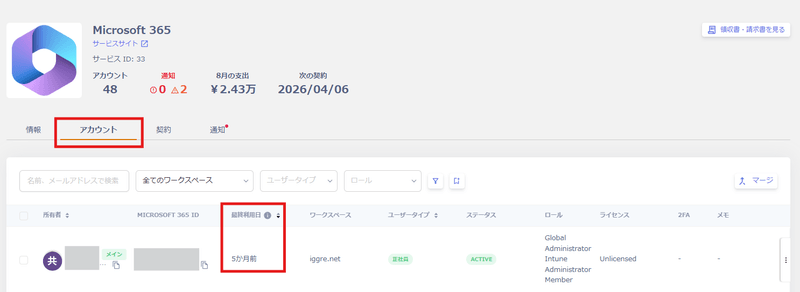
How the Data Is Collected
Last Activity data is collected through three methods.- Direct API retrieval. This method retrieves the Last Activity date via API using the value stored in the SaaS.
For SaaS applications that support this method, see the Supported SaaS and Features List. Check the Retrievable Data >Last Activitycolumn. - Login history (Google, Microsoft 365, or Microsoft Entra ID). This method uses login history instead of API access.
Some SaaS applications don’t support direct API retrieval (method 1). For these, this method calculates the Last Activity date from Google, Microsoft 365, or Entra ID login history. For log retrieval conditions, see the main Shadow IT detection methods.
If no login occurs for an extended period after the previous login, the value may not reflect accurately. Use the Chrome extension below in that case. - Browser extension
Installing the browser extension retrieves the Last Activity date from SaaS access history. For usage instructions, see Distribute the Browser Extension to Detect Shadow IT and Retrieve Service Activity.