

Supported Features
Device AggregationThis page describes the integration procedure for device data. For account integration, see LANSCOPE Endpoint Manager.
- API access registration for LANSCOPE Endpoint Manager Cloud Edition is required in advance to obtain the access key used for the integration.
- A device management contract is required to use this feature. If you would like to trial the device management feature, please contact us via chat.
Prerequisites (LANSCOPE Endpoint Manager)
Go to the LANSCOPE Endpoint Manager login page and enter your account credentials to log in.
How to Obtain Your Workspace Key
After logging in to LANSCOPE Endpoint Manager (Device), check the URL — part of the URL is your workspace key. Save it for later.How to Obtain Your Access Key
API access registration for LANSCOPE Endpoint Manager Cloud Edition is required to obtain the access key. Log in to LANSCOPE Endpoint Manager Data Integration Settings and open API Token Settings. The API token is your access key — create one or copy the existing one.
Integration Setup (Admina)
- In Admina, go to Integrations and search for LANSCOPE Endpoint Manager (Device).
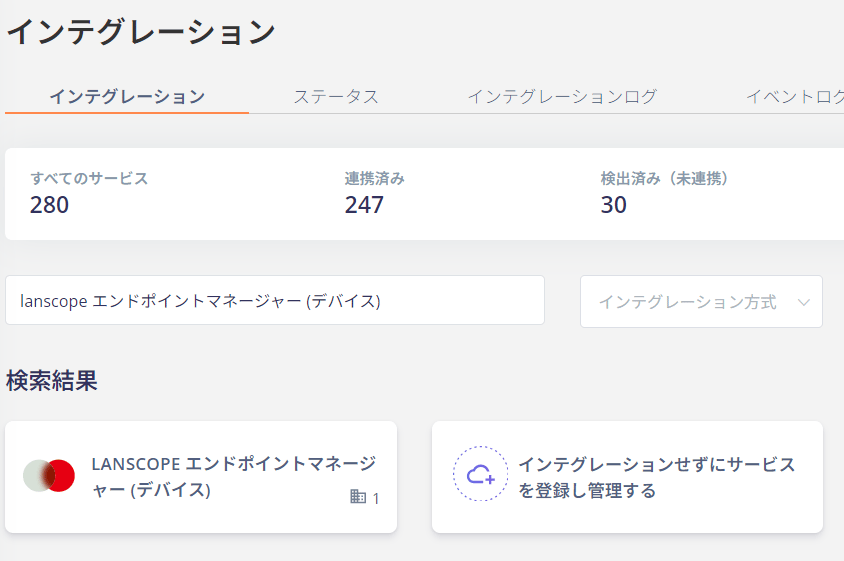
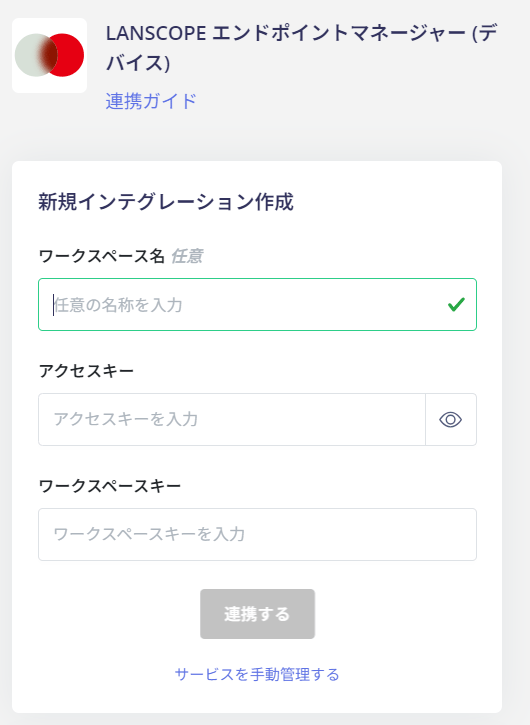
- Enter the workspace key and access key obtained in the previous steps, then click Connect. The workspace name is optional.
- The integration with LANSCOPE Endpoint Manager is now complete. If it does not complete successfully, click Edit from the Status tab on the integrations screen and try again. If the issue persists, please contact us via chat.
Owner information (email address, etc.) cannot be retrieved.
MDM Integration
If you are using the device management feature, device synchronization with Jamf is available. 4-0. Integrating MDM-compatible SaaS with the Admina Device LedgerSupported LANSCOPE services for synchronization
- LANSCOPE Endpoint Manager Cloud Edition
Synchronization Fields
| Admina Field | Sync Pattern | LANSCOPE Field | Notes |
|---|---|---|---|
| Asset Number | (2) Admina-based | lanscope_device_<hostname> | A prefix is added if duplicated. |
| Model Name | (2) Admina-based | Model name | If the model name is empty, it is generated from manufacturer_product name. |
| Serial Number (IMEI) | (1) MDM-based | Serial number | Merge key |
| Type | (2) Admina-based | Device type | ”pc, laptop” → Laptop PC ”desktop” → Desktop PC ”tablet” → Tablet PC ”mobile” → Phone If device type is blank, OS type is used: “Windows, MAC” → Laptop PC ”IOS, ANDROID” → Phone ”peripheral” → Not imported |
| Status | (2) Admina-based | Usage status type | In use → In use Unused → In stock Out of order → Disposed/Cancelled Scheduled for disposal → Disposed/Cancelled Disposed → Disposed/Cancelled ”Other” or blank: In use if an owner exists, otherwise In stock. |
| Hostname | (1) MDM-based | Computer name | |
| HDD/SSD | (1) MDM-based | Storage usage | |
| OS | (1) MDM-based | OS | |
| CPU | (1) MDM-based | CPU name | |
| Memory | (1) MDM-based | Memory | |
| Last Used (MDM) | (1) MDM-based | LANSCOPE client last active date | |
| Managed | (3) MDM field | Managed: MDM enabled |